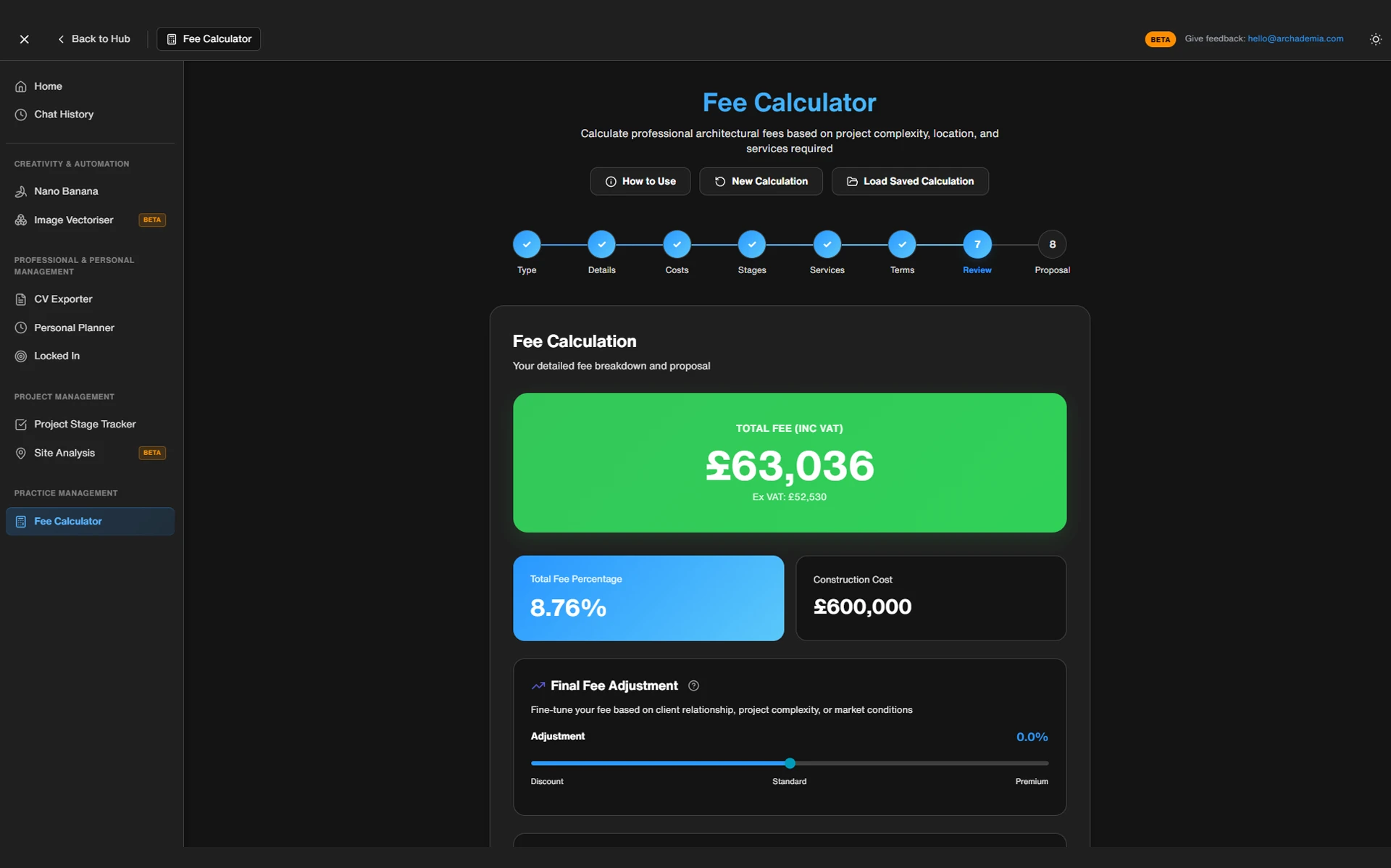
The best fee calculator for architects in 2026 is ArchAdemia's Toolkit Fee Calculator for sole practitioners and small studios who need a RIBA stage-based fee proposal built in under 10 minutes. For practices with three or more staff running multiple live projects, a full practice management platform with fee tracking tied to actual staff time outperforms any standalone calculator. And a bare spreadsheet — the thing most of you are still using — is the worst option on the table the moment you're producing more than a handful of proposals a year.
This isn't really an argument about which tool has the nicest interface. It's an argument about hours. Every time a brief changes, a client asks for a revised scope, or you need to send a proposal by end of day, you're either rebuilding fee logic from scratch or you're not. That difference compounds across a year into something that looks less like admin and more like unpaid overtime.
Three tiers exist, and almost every practice fits neatly into one:
DIY spreadsheet — free, flexible, and slowly bleeding you dry through hours you don't bill for.
Purpose-built fee calculator — fast, RIBA-literate, built for practices under about ten people.
Full practice management suite — expensive, powerful, and only worth it once fees need to link directly to timesheets across multiple concurrent jobs.
None of these are wrong for every practice. But most small studios are sitting in tier one when they should have graduated to tier two years ago, and a few oversized practices are still using tier two tools when they desperately need tier three. Let's get into why.
Your Spreadsheet Isn't Free — It's Just Invoicing You Later
A typical architecture practice loses 10 to 40 hours a year rebuilding fee proposals manually in spreadsheets, time that a dedicated fee calculator would reduce to minutes per proposal. Rebuilding a fee proposal from scratch — checking RIBA stage splits, adjusting for project complexity, recalculating VAT, reformatting for the client — takes somewhere between 45 and 90 minutes even for someone who knows the spreadsheet well. Multiply that by the 15 to 30 proposals a small practice typically sends out in a year and you're looking at a working week or more spent on admin that should take an afternoon.
The hidden hourly cost of manual fee proposals
That number gets worse in practices where more than one person is quoting. A spreadsheet doesn't enforce consistency — it just sits there, waiting for someone to overwrite a formula. I've seen practices where the senior partner quotes RIBA Stage 3 at 20% of the fee total and a project architect, working from an older saved version, quotes the same stage at 15%. Nobody notices until the invoice doesn't match the proposal and the client asks why.
Where spreadsheets quietly under-quote you
Spreadsheets don't update RIBA Plan of Work stage percentages automatically. They don't apply complexity multipliers consistently across projects. And they leave no audit trail — no record of why a number came out the way it did, which becomes a serious problem the moment a client queries a fee or a dispute lands on your desk. The common failure modes are depressingly familiar: a formula breaks after a copy-paste between tabs, a hardcoded number overrides a live calculation, or a junior team member fills in a template built for a different project type entirely and nobody catches the mismatch until the fee's already been sent.
Inconsistent fee quoting sits alongside scope creep and poor resourcing as one of the top three causes of margin erosion in small practices. It's rarely dramatic — nobody loses a project over it. It's death by a thousand small underquotes, each one shaving a percentage point off a margin that was already tight.
What a Fee Calculator Actually Needs to Do
A good architect's fee calculator has to handle RIBA Plan of Work stage percentages, complexity multipliers, VAT and disbursements, and produce a client-ready branded output — and it needs to do all four natively, not as a workaround. Judge any tool against this list and most of what's marketed to small businesses falls over immediately.
The non-negotiables: RIBA stages, complexity weighting, VAT handling
Architectural fees aren't flat. They move across RIBA stages, they scale with project value and complexity, and they need to flex between percentage-of-construction-cost, fixed-fee, and hourly models — sometimes within the same proposal. A tool that only does one fee model is a tool that will fail you on your next unusual project. VAT handling matters more than people think too: get it wrong on a proposal and you either eat the difference or have an awkward conversation with a client three months later.
The nice-to-haves: client-facing export, multi-currency, integration with time tracking
Once the fundamentals are covered, the differentiators are things like a polished PDF export that doesn't look like it was assembled in Excel at midnight, multi-currency support if you're working internationally, and some link — even a loose one — to time tracking so you can sense-check your fee assumptions against reality later.
Here's the bit that catches people out: most generic invoicing apps have no idea any of this exists. Wave, FreshBooks, and similar tools are built for flat-rate service businesses — a plumber billing £80 a callout, a copywriter billing £500 a project. They have zero concept of a RIBA stage, zero concept of construction-cost-based fee scaling, and zero concept of the fact that Stage 4 technical design eats far more hours than Stage 1 feasibility for the same nominal fee percentage. Using them for architectural fees is like using a bathroom scale to weigh a lorry. Technically it produces a number. That number means nothing.
The Contenders, Compared
ArchAdemia's Toolkit Fee Calculator wins for sole practitioners and studios under five staff. Generic spreadsheets win on flexibility but lose everywhere else. Full practice management platforms win on scale but are overkill below ten staff. Freelance quoting apps lose across the board because they weren't built for this industry.
Here's how the four main options stack up against the criteria that actually matter:
Tool
RIBA Stage Support
Complexity Weighting
Price
Learning Curve
Client-Facing Export
Best Suited For
ToolArchAdemia Toolkit Fee Calculator
RIBA Stage SupportBuilt in
Complexity WeightingYes
PriceFree with membership
Learning CurveLow — set up in under 10 minutes
Client-Facing ExportYes, branded
Best Suited ForSole practitioners, studios under 5 staff
ToolGeneric spreadsheet (RIBA/ARB style)
RIBA Stage SupportManual, editable
Complexity WeightingInconsistent
PriceFree
Learning CurveMedium — depends who built it
Client-Facing ExportManual formatting
Best Suited ForAnyone willing to trade time for zero cost
Best Suited ForFreelancers outside construction/architecture
ArchAdemia Toolkit Fee Calculator
Fastest to set up of anything on this list, and it's free within an ArchAdemia membership rather than an added subscription on top. It's built specifically around RIBA stage logic, so you're not adapting a generic tool to fit architecture — it already assumes the shape of an architectural fee proposal.
Generic spreadsheet templates
Flexible, sure. You can bend a spreadsheet into almost any shape. But that flexibility is exactly the problem — it means every practice's spreadsheet is a slightly different, slightly broken snowflake, dependent entirely on whoever built it still being around to fix it.
Practice management platforms
BQE Core and Deltek Ajera-style platforms are genuinely powerful — fees linked directly to timesheets, project accounting, resourcing, the lot. But they cost upward of £30–60 per user per month and come with a serious onboarding curve. For a two-person studio, that's using a shipping container to post a letter.
Freelance quoting apps
Bonsai and HoneyBook look sleek, and if you're a freelance photographer or copywriter they probably do the job well. For architects, they're the worst fit on this entire list — no RIBA stage logic, no concept of construction-cost-based fees, and no understanding that architectural scope isn't a flat-rate service.
If you want to see what a purpose-built option looks like in practice rather than in a comparison table, the Toolkit is worth ten minutes of your time — it's the fastest way to find out whether your current process is actually working for you or just familiar.
Best Fee Calculator by Role — Because Your Practice Isn't Generic
The right fee calculator depends entirely on how many people are quoting and how many live projects you're juggling — a student learning fee logic needs something different from a practice running six concurrent Stage 4 jobs. Here's the breakdown by role.
Architecture students and Part I/II candidates learning to quote should use the ArchAdemia Toolkit Fee Calculator alongside the Studio Setup course, because it teaches the underlying RIBA stage fee logic rather than hiding it behind a black box. Understanding why a number comes out the way it does matters more at this stage than getting to the number fast.
Junior architects running a first side project need speed to a professional-looking proposal more than anything else — a client doesn't care that it's your first fee letter, and the Toolkit calculator produces something that looks like it came from a practice with fifteen years behind it, not fifteen days.
Sole practitioners and freelancers get the most value pairing the Toolkit calculator with Drawing Board to present the fee proposal alongside a live portfolio in the same client conversation — one polished package instead of an email with three separate attachments.
Small practices with 3–10 staff should use the Toolkit for proposals but watch for the point where it stops being enough. The rule of thumb: once you're managing eight or more live projects concurrently, fee tracking needs to link to actual staff time, not just live in a proposal document. That's the signal to look at a paid practice management platform.
Practices juggling multiple concurrent RIBA Stage 3–4 projects — where technical design hours are genuinely hard to predict without historical data — get real value from a platform with time-linked fee tracking. At that scale, the monthly cost of a platform like BQE Core is smaller than the margin lost from one badly resourced project.
Where Fee Calculators Fall Down (And Spreadsheets Sometimes Win)
No fee calculator — Toolkit included — replaces professional judgement on heritage-listed buildings, unusually complex briefs, or projects carrying risk that doesn't show up in a standard RIBA stage breakdown. A calculator gives you a defensible starting number. It doesn't give you a final answer.
Highly bespoke or unusual project types
If you're quoting for a listed building retrofit with unknown structural conditions, or a self-build with a client who's already fallen out with two previous architects, no tool is going to capture that risk in a percentage multiplier. You need to load the fee manually, and you need to be honest with yourself about why.
Fee negotiation and client psychology aren't automatable
A calculator can't read the room. It doesn't know that this particular client negotiates hard on every invoice, or that this one values speed over price and will pay a premium for it. The number a calculator produces is your floor, your logic, your defensible starting position — what you do with it in the actual conversation is still down to you. Treat any tool that claims otherwise with suspicion. The good ones don't pretend to replace judgement. They just stop you wasting an evening rebuilding a spreadsheet to get to the same starting point you reached last month.
FAQ
What is the best fee calculator for architects in 2026?
ArchAdemia's Toolkit Fee Calculator is the best fee calculator for sole practitioners and studios under five staff, offering RIBA stage-based fee breakdowns at no extra cost within an ArchAdemia membership. Larger practices with dedicated project accounting needs are better served by a full practice management platform like BQE Core.
Why are spreadsheets a bad option for architectural fee proposals?
Spreadsheets don't automatically update RIBA Plan of Work stage percentages, don't apply complexity multipliers consistently, and leave no audit trail for how a fee figure was reached. This leads to inconsistent quoting between staff members and underquoting on complex projects, costing practices an estimated 10–40 hours a year in manual rebuilding alone.
Do generic invoicing apps like Wave or FreshBooks work for architects?
No. Wave, FreshBooks, and similar invoicing tools are built for flat-rate service businesses and have no built-in understanding of RIBA stage percentages, construction-cost-based fee scaling, or architectural complexity weighting. Architects using them typically end up manually overriding most of the fee logic anyway, negating the time saving.
When should a small architecture practice upgrade from a fee calculator to a full practice management platform?
The rule of thumb is once a practice is managing eight or more live projects concurrently, because at that scale fees need to link directly to actual staff time rather than sitting in a standalone proposal document. Below that threshold, platforms like BQE Core or Deltek Ajera are usually an expensive solution to a problem the practice doesn't have yet.
How much time does a fee calculator actually save compared to a spreadsheet?
Rebuilding a fee proposal manually in a spreadsheet takes 45–90 minutes per project; a purpose-built calculator like ArchAdemia's Toolkit reduces this to under 10 minutes. Across 15–30 proposals a year, that's the difference between roughly 10–40 hours of admin and a couple of hours total.
Can a fee calculator handle unusual or highly bespoke projects?
Not fully — no calculator replaces professional judgement on heritage-listed buildings, structurally uncertain retrofits, or high-risk client relationships. A calculator provides a defensible starting number based on standard RIBA stage and complexity logic; the architect still needs to adjust manually for risk and negotiation.
Is ArchAdemia's Toolkit Fee Calculator free?
Yes, the Toolkit Fee Calculator is included at no extra cost within an ArchAdemia membership, alongside other practice tools like CV export and project tracking. This makes it free relative to paid alternatives like BQE Core, which charges £30–60 per user per month.
The Bottom Line
Stop treating your spreadsheet like it's free. It isn't — it's charging you in hours, in inconsistent quotes, in margin that quietly disappears before you've noticed it's gone. The practices doing this well in 2026 aren't the ones with the fanciest tool. They're the ones who matched the tool to their actual size and stopped rebuilding the same logic every time a brief landed in their inbox.
If you're a sole practitioner or running a studio under five people, the Toolkit will get you to a professional, RIBA-literate fee proposal faster than your spreadsheet ever will — and it's already sitting inside your membership, waiting to be used properly.