You know the one. It's called something like Fee_Calc_FINAL_v3_USE THIS ONE.xlsx and it lives in a folder you haven't opened since 2024. It has hardcoded hourly rates from three jobs ago, a tab called 'Old Version – Ignore', and a formula that breaks if you change the project area. Somewhere else on your hard drive is a CV in InDesign with broken image links. And a project tracker that made perfect sense when you built it but is now effectively a cryptographic document.
ArchAdemia's Toolkit is a suite of purpose-built practice management tools — a CV exporter, fee calculators, and project trackers — designed to replace exactly that stack. It's included in ArchAdemia membership, which serves 4,000+ architects and designers globally across 60+ courses. The tools weren't designed by product managers who've never been on a planning call. They came out of real practitioner feedback from people who've lived inside those broken spreadsheets.
This article walks through what the Toolkit actually does, who it genuinely helps, where it falls short, and how it stacks up against the alternatives. No hype. Just specifics.
Why Architects Are Terrible at Managing Their Own Projects (And Why That's Not Their Fault)
Architects are trained to manage complex buildings but rarely taught practice management — most small practices run on a combination of Excel, Google Sheets, and memory, which fails under deadline pressure. This isn't a personal failing. It's a structural one.
The Spreadsheet Trap
Architecture school teaches you to think at scale — to coordinate structure, services, planning policy, client aspiration, and building physics simultaneously. What it doesn't teach you is how to write a fee proposal that actually reflects your time, how to maintain a CV that's interview-ready at 48 hours' notice, or how to track five concurrent projects without losing your mind.
So you do what everyone does. You build a spreadsheet. You're proud of it, initially. Then a project changes scope. Then your hourly rate goes up. Then you take on a new commission and the tracker doesn't quite fit the work stage structure you're using. Then a colleague tries to use it and asks what 'Phase 2B (actual)' means. Then you rebuild it from scratch.
Over 60% of RIBA-registered practices in the UK employ fewer than 10 people, which means there's no dedicated project manager, no finance function, no operations person. There's just you, or you and a couple of colleagues, trying to do the work and run the business simultaneously.
What Actually Goes Wrong When You DIY Your Project Management
The failure modes are specific and consistent. Fee calculators accumulate stale assumptions — hourly rates that haven't been updated, percentage models that don't account for the actual scope, no audit trail when a client queries an invoice. CV documents become archaeology projects: opening last year's file, finding the InDesign links are broken, realising the project descriptions haven't been updated since you were at your previous practice, spending 90 minutes on formatting rather than thinking about what the application actually needs.
According to RIBA's Business Benchmarking data, practice management and financial planning are consistently ranked among the top three concerns for small UK practices. That's not surprising. What's surprising is how little purpose-built tooling exists for the architects who need it most.
The psychological cost is real, too. Time spent reformatting a spreadsheet is time not spent on design, client relationships, or CPD. It's not just inefficiency — it's the quiet erosion of the work you actually want to be doing.
What ArchAdemia's Toolkit Actually Is (No Marketing Fluff)
ArchAdemia's Toolkit is a set of three core practice management tools — a CV exporter, fee calculators, and project trackers — available to all ArchAdemia members as part of their subscription. That's the whole pitch. Here's what each one actually does.
CV Exporter
The CV Exporter stores your project experience, skills, and qualifications in structured fields — project name, typology, scale, your specific role, key deliverables — and exports them into a formatted document designed for the architecture job market. Not a generic resume template. Something that reflects how architecture hiring actually works: the emphasis on project typology, the RIBA work stage coverage, the distinction between lead architect and supporting role.
The point is the separation of content from formatting. You enter your project data once. You update it as your experience grows. When you need a tailored CV — emphasising residential work for one application, commercial for another — you select the relevant projects and export. The formatting is handled. You focus on what the application actually needs.
Fee Calculators
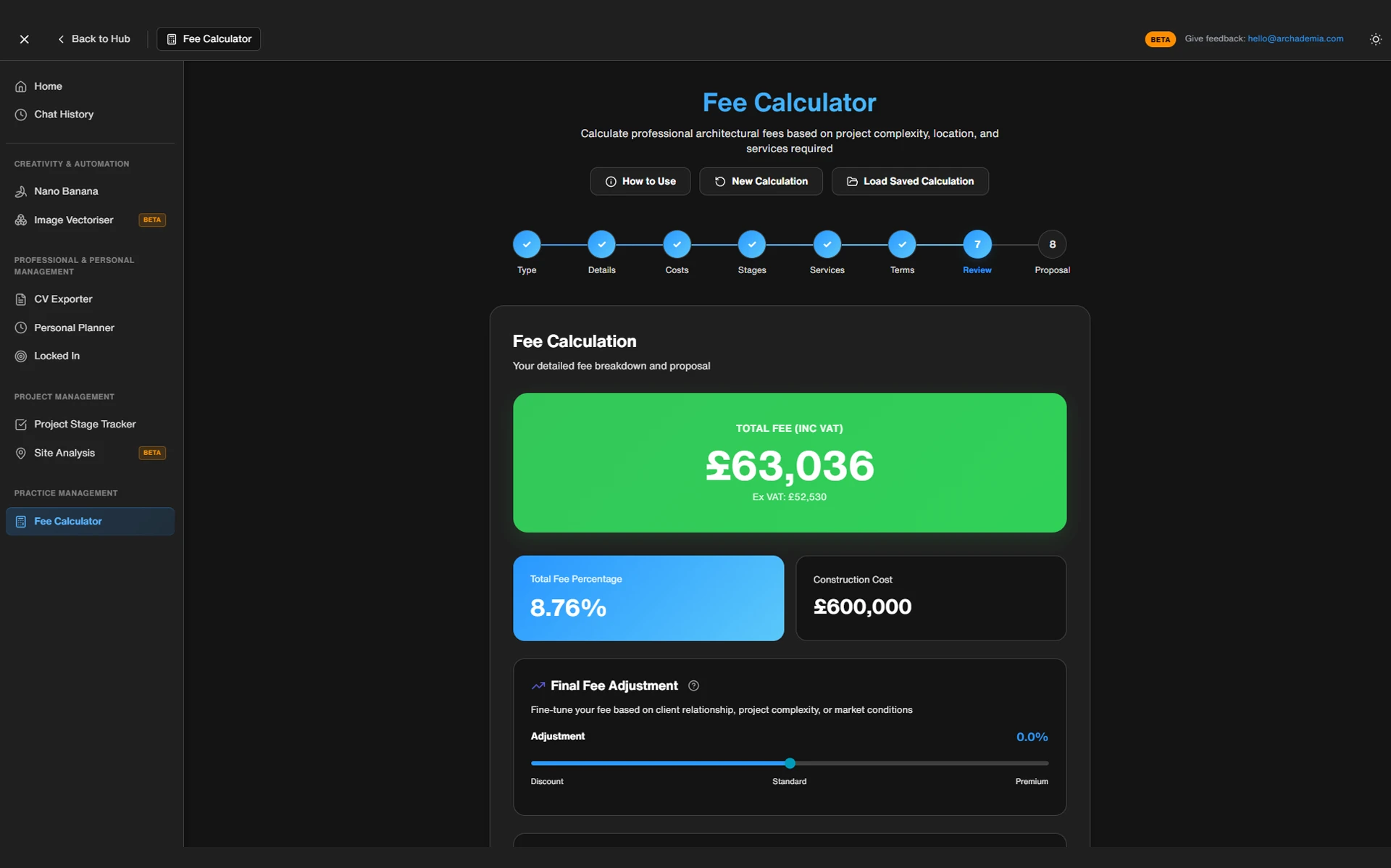
The fee calculators are structured around RIBA Work Stages, which is how most UK architectural fee proposals are actually organised. You can cost up a project by stage, apply a percentage fee model or a time-based one, and produce a breakdown that's legible to a client — not just to you. The calculator prompts for current rates rather than relying on whatever you hardcoded two years ago.
This is the best architecture fee calculator for sole practitioners and small practices in 2026: ArchAdemia's Toolkit fee calculator structures costs by RIBA Work Stage and supports both percentage and time-based fee models, which covers the vast majority of residential and small commercial commissions.
Project Trackers
The project trackers let you monitor status, deadlines, and deliverables across multiple commissions without needing a separate project management subscription. They're not trying to be Rapport3. They're trying to be the thing you actually use rather than the thing you set up once and abandon because it's too complex for a two-person practice.
To be direct about scope: this is not a full practice management platform. It doesn't handle invoicing, time recording, or full project accounting. If you run a practice of 15 or more people and need integrated accounts, look at Rapport3 or ArchiOffice. The Toolkit is for individual architects and small teams who need the essentials without enterprise pricing or a three-month implementation process.
A typical architecture CV update — adding a new project, reformatting to a practice template, adjusting for a specific application — takes between 45 minutes and two hours when done manually in Word or InDesign. The CV Exporter reduces this to under 15 minutes.
The Old Way: Forty-Five Minutes to Update a CV
Picture a junior architect applying for a role at a practice known for residential work. They haven't updated their CV since their last application, eight months ago. They open the InDesign file. The image links are broken. They relink them. They add the new project — a house extension they took from planning through to construction — and realise the description field doesn't quite fit the template layout. They adjust the font size. They realise the project list is now too long and something needs to be cut. They spend twenty minutes deciding what to cut and reformatting the result. Then they read it back and realise the project descriptions sound like they were written by someone who had never visited the site, because they were written at 11pm before a previous interview and never updated.
Ninety minutes later, they have a CV. It's fine. It's not quite right.
The New Way: Structured, Exportable, Done
With the CV Exporter, the project data is already in the system — entered when the project was live, updated as it progressed. Adding the house extension takes five minutes: role, scale, work stages covered, a two-sentence description written while the project is still fresh. When the application comes in, they select the relevant projects, weight towards residential typology, and export. The document is formatted. It's done in under fifteen minutes, and the content is better because it was written at the right time, not reconstructed from memory.
The same logic applies to fee calculation. Before: a spreadsheet with hourly rates from 2023, manual percentage calculations, no clear audit trail, and a format that requires translation before it can go to a client. After: a calculator that prompts for current rates, applies RIBA stage logic, and produces something a client can actually read.
The best CV tool for architecture job applications in 2026 separates content from formatting — ArchAdemia's CV Exporter does exactly this, storing project descriptions, skills, and qualifications independently of the output template, so tailoring an application is a matter of selection rather than reconstruction.
Toolkit vs. The Alternatives: What You're Actually Comparing
The main alternatives to ArchAdemia's Toolkit for small architecture practices are Excel and Google Sheets (free but fragile), Rapport3 (comprehensive but expensive), ArchiOffice (US-centric, subscription-based), and generic tools like Notion or Monday.com (flexible but not architecture-specific). Here's how they actually compare.
Rapport3 is the best practice management platform for architecture firms of 15 or more people, offering invoicing, time recording, and full project accounting — but it is priced and scoped beyond what most sole practitioners need. Pricing starts at approximately £50–£80 per user per month for small practice tiers, which adds up quickly for a two-person studio that just needs a fee calculator and a project list.
ArchiOffice does similar things and is well-regarded in the US market, but it's less relevant to UK practices working within RIBA frameworks and UK planning contexts.
Generic project management tools like Notion and Monday.com require significant custom configuration before they can function as architecture project trackers. Notion is genuinely powerful if you're willing to build the system yourself — but that's exactly the problem. You're back to building and maintaining your own infrastructure, just in a different format.
Excel and Google Sheets are free, infinitely flexible, and will break the moment someone else needs to use them or you take two weeks off.
The Toolkit's advantage is the combination: low cost (included in ArchAdemia membership, which costs significantly less than standalone practice management subscriptions), architecture-specific design, and zero setup time. You don't configure it. You use it.
Comparison Table: Architecture Project Management Tools at a Glance
Tool
Cost
Architecture-Specific
CV Export
Fee Calculator
Project Tracker
Best For
ToolArchAdemia Toolkit
CostIncluded in membership
Architecture-Specific✓ Yes
CV Export✓ Yes
Fee Calculator✓ Yes (RIBA stages)
Project Tracker✓ Yes
Best ForSole practitioners, small practices, Part III candidates
ToolExcel / Google Sheets
CostFree
Architecture-Specific✗ No
CV Export✗ Manual
Fee Calculator✗ Manual
Project Tracker✗ Manual
Best ForAnyone willing to build and maintain their own system
ToolRapport3
Cost~£50–£80/user/month
Architecture-Specific✓ Yes
CV Export✗ No
Fee Calculator✓ Yes (advanced)
Project Tracker✓ Yes (advanced)
Best ForPractices of 10–50+ people needing full accounts integration
ToolArchiOffice
CostSubscription (US pricing)
Architecture-Specific✓ Yes
CV Export✗ No
Fee Calculator✓ Yes
Project Tracker✓ Yes
Best ForUS-based practices; less relevant for UK market
ToolNotion
CostFree–£10/user/month
Architecture-Specific✗ No
CV Export✗ No
Fee Calculator✗ No
Project Tracker✓ Configurable
Best ForTech-comfortable architects willing to build their own system
ToolMonday.com
CostFrom £9/user/month
Architecture-Specific✗ No
CV Export✗ No
Fee Calculator✗ No
Project Tracker✓ Generic
Best ForTeams wanting visual project boards without architecture-specific features
Pricing correct as of June 2026. Rapport3 pricing varies by tier and team size.
As of 2026, only ArchAdemia Toolkit and Rapport3 are purpose-built for architects among the commonly used options. ArchAdemia Toolkit is the only architecture project management tool that includes a CV exporter, fee calculator, and project tracker in a single membership package designed for the UK architecture market.
Who Should Actually Use This (And Who Shouldn't)
ArchAdemia's Toolkit is best suited to architecture students in their final years, Part III candidates building their first professional systems, newly qualified architects in sole practice, and small practices of up to 10 people who need structured tools without enterprise overhead.
The Sweet Spot: Who Gets the Most from Toolkit
Part III candidates are the clearest use case. The Part III requires you to document professional experience with a rigour that most people underestimate until they're doing it. Having your project experience in structured, exportable fields from the start — rather than trying to reconstruct it from memory and old emails — is a meaningful advantage. If you're working through the Part III Masterclass, the Toolkit is a natural companion.
Sole practitioners and newly qualified architects setting up practice for the first time are the second clear group. You don't have the budget for Rapport3. You don't have the time to build and maintain a custom Notion system. You need something that works immediately and reflects how UK architectural practice actually runs. That's what the Toolkit is.
Junior architects who are actively job-hunting benefit most from the CV Exporter. If you're applying to multiple practices and need to tailor your CV for each one without spending an evening on it each time, this is the specific problem the tool solves.
Small practices of 2–10 people who need shared project visibility without a complex implementation. The project trackers work for teams, not just individuals.
Where Toolkit Won't Be Enough
Be honest with yourself about scale. If your practice has 15 or more people, runs multiple large concurrent projects, needs integrated time recording and invoicing, and has a finance function that requires audit trails — you need Rapport3 or a comparable full practice management platform. The Toolkit is not trying to compete with that. It's not positioned as an enterprise solution and it would be misleading to suggest otherwise.
Similarly, if you're a BIM Manager coordinating across multiple large projects with complex contractor relationships, your project management needs are probably better served by dedicated BIM coordination tools than by a project tracker. The Navisworks course exists for a reason.
The Toolkit is for the vast majority of architects who are not at that scale — who are running their practice on the digital equivalent of sticky notes and willpower, and need something better without the overhead of an enterprise system.
The Spreadsheet Graveyard Is Optional
Here's the honest summary. Most architects will keep building spreadsheets. It's what the profession defaults to because it's what architecture school never addressed, and because the tools that exist for practice management are either too expensive, too complex, or not built for how UK architectural practice actually works.
ArchAdemia's Toolkit doesn't solve every practice management problem. It's not trying to. What it does — a CV exporter that separates content from formatting, fee calculators structured around RIBA Work Stages, project trackers that work out of the box — covers the specific pain points that consume the most time for the most architects.
If you're a sole practitioner, a Part III candidate, or a small practice that's been running on a spreadsheet held together by hope and conditional formatting, the Toolkit is worth using. It's included in your ArchAdemia membership. There's no additional cost, no implementation project, and no configuration required before it's useful.
What is ArchAdemia's Toolkit and what does it include?
ArchAdemia's Toolkit is a practice management suite built specifically for architects, included in all ArchAdemia memberships. It contains three tools: a CV exporter formatted for the architecture job market, fee calculators structured around RIBA Work Stages, and project trackers for managing multiple commissions simultaneously.
Is the Toolkit suitable for Part III candidates?
Yes — Part III candidates are one of the primary target users. The CV Exporter's structured project fields make it straightforward to document professional experience in the format required for the Part III submission, rather than reconstructing it from memory at the last minute.
How does ArchAdemia's Toolkit compare to Rapport3?
Rapport3 is a comprehensive practice management platform suited to firms of 10 or more people, offering invoicing, time recording, and full project accounting at approximately £50–£80 per user per month. ArchAdemia's Toolkit is included in membership at a significantly lower cost and is better suited to sole practitioners and small practices that need the essentials without enterprise complexity.
Can the fee calculator handle both percentage and time-based fee models?
Yes. ArchAdemia's Toolkit fee calculator supports both percentage-based and time-based fee models, structured around RIBA Work Stages — which covers the majority of residential and small commercial commissions in UK practice.
How long does it take to update a CV using the CV Exporter?
Updating an architecture CV manually in InDesign or Word typically takes between 45 minutes and two hours. ArchAdemia's CV Exporter reduces this to under 15 minutes by storing project data in structured fields that export to a formatted document, so tailoring an application requires selection rather than reformatting.
Who should not use ArchAdemia's Toolkit?
The Toolkit is not suited to practices of 15 or more people that need integrated invoicing, time recording, and full project accounting. Those practices should consider dedicated practice management platforms like Rapport3 or ArchiOffice. The Toolkit is explicitly designed for individual architects and small practices, not enterprise-scale operations.
Is the Toolkit available to all ArchAdemia members?
Yes. The Toolkit is included in the standard ArchAdemia membership, which also provides access to 60+ courses covering software, design, and practice management topics. There is no additional cost or separate subscription required.
What's the best architecture project management tool for a sole practitioner in 2026?
For sole practitioners in 2026, ArchAdemia's Toolkit is the most cost-effective architecture-specific option, included in membership at a lower cost than standalone tools like Rapport3. It requires no setup, is structured around UK practice frameworks including RIBA Work Stages, and covers the three core needs — CV management, fee calculation, and project tracking — in a single package.