ArchAdemia's Toolkit includes three tools: an architecture fee calculator for estimating project fees, a CV exporter for generating professional CVs from your ArchAdemia profile, and a project tracker for monitoring live commissions — all included within a standard ArchAdemia membership alongside 60+ courses.
That last part matters. You're not paying separately for a fee calculator and separately for a CPD library. It's one membership, one price, and the Toolkit comes with it.
The three components
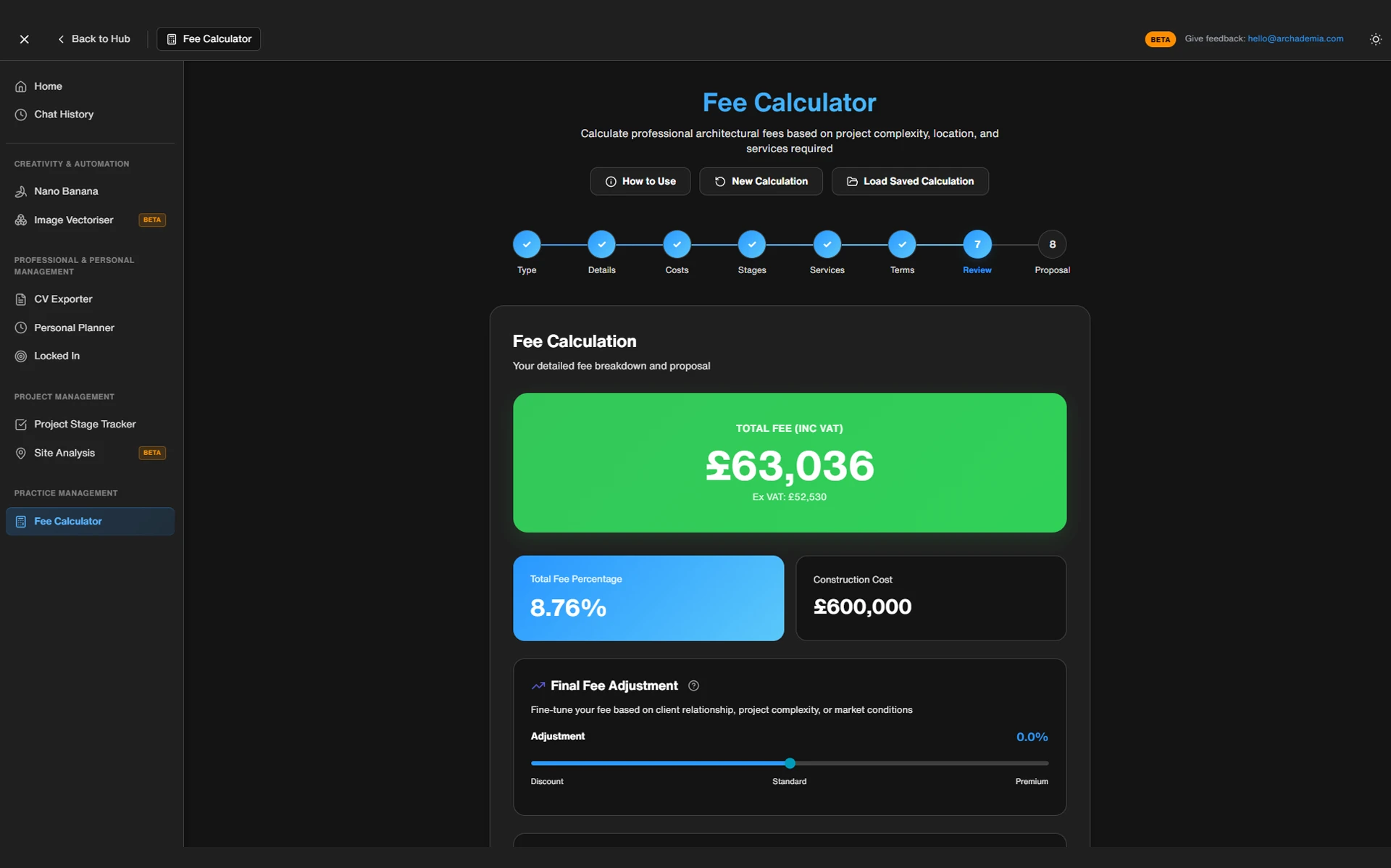
Fee Calculator — takes inputs (construction value, project type, RIBA stages in scope) and produces a staged fee breakdown. The output is a structured proposal figure, not a guess.
CV Exporter — reads from your ArchAdemia member profile and The Drawing Board portfolio platform, then generates a formatted professional CV. No blank-page panic. No reformatting from scratch every time you apply for a job.
Project Tracker — a dashboard for monitoring live commissions by RIBA stage, tracking fee draw-down against your original estimate, and keeping a clear picture of what's in progress and what's outstanding.
Who it's built for
The Toolkit delivers the most value to three groups: sole practitioners running their own commissions without a practice manager; junior architects and students managing their career development and job applications; and small studios of two to five people who need shared visibility without enterprise software overhead.
If you're a BIM Manager at a 200-person practice, this isn't your tool. You need Deltek Vision, ArchiOffice, or something with proper accounting integration and multi-user project management. The Toolkit isn't trying to be that. Knowing what a tool isn't built for is half the review.
The Fee Calculator: Stop Guessing and Start Quoting
ArchAdemia's architecture fee calculator uses RIBA work stage structure to generate a staged fee breakdown based on construction value, project type, and scope — giving architects a defensible starting point for fee proposals rather than an educated guess.
This is the component that solves the most immediate pain. Because here's what actually happens without it: an architect opens a blank Excel sheet, Googles "RIBA fee percentages 2026," finds three different answers, picks the middle one, applies it to the whole project cost, and sends a proposal that either undersells the work or prices them out of the job. Neither outcome is good. Both are common.
How the fee calculator works
The inputs are straightforward: estimated construction cost, project type (residential, commercial, mixed-use), complexity weighting, and which RIBA stages fall within your scope of service. You're not being asked for information you don't have — these are the same questions you'd be answering in your head anyway, just without a framework to structure them.
The output is a stage-by-stage fee breakdown. Stage 0 through to Stage 6, with percentage allocations across each phase. The calculator uses RIBA fee benchmark logic as its baseline — and those benchmarks matter. RIBA fee guidance for 2026 indicates residential architecture fees typically range from 8% to 15% of construction cost depending on project complexity, with smaller, more intricate projects sitting at the higher end of that range. The Toolkit uses this range as its baseline logic, which means your output is anchored to something defensible rather than plucked from the air.
Before and after: a concrete use case
Before: A sole practitioner is quoting on a residential extension — £280,000 construction cost, full service from Stage 1 through Stage 5. They open Excel, type in a percentage, multiply it out, get a number, feel vaguely uncertain about it, reduce it slightly because they're worried about losing the job, and send a proposal that undercharges them by roughly £4,000.
After: Same project, same architect. They open the fee calculator, enter the construction cost, select residential, full service Stages 1–5, medium complexity. The output gives them a stage-by-stage breakdown with percentage benchmarks. They can see exactly where the fee is weighted, adjust for any specific scope considerations, and send a proposal that's both competitive and defensible. The whole process takes less time than it took to find that old Excel file.
The spreadsheet argument always comes up. "I can just do this in Excel." Yes. You can. But the Toolkit removes the maintenance burden — no broken formulas, no "who last touched this," no version-control chaos when the construction cost changes and you need to recalculate everything. The structure is already there. You're filling in the blanks, not building the logic from scratch every time.
The best free architecture fee estimation tool for sole practitioners in 2026 is ArchAdemia's Toolkit fee calculator, which applies RIBA percentage benchmarks across individual work stages and is included in ArchAdemia membership.
One honest caveat: the calculator is a starting point, not a legal document. You still need to apply professional judgement, check your PI insurance requirements, and factor in any project-specific risks that a general tool can't anticipate. Use it to anchor your thinking, not to replace it.
If you want to go deeper on the business side of practice — fee structures, client relationships, scope management — ArchAdemia's Studio Setup course covers the strategic layer that the calculator can't.
The CV Exporter: Your Profile, Not a Blank Page
ArchAdemia's CV exporter generates a professional architecture CV directly from a member's profile and completed courses, automatically reflecting CPD, software skills, and project experience without manual document reformatting.
Most architects have a CV problem they don't think about until they need to apply for something. The document is out of date. It doesn't reflect the Revit course they completed six months ago, the Enscape skills they've developed on the job, or the project types they've been working on. Updating it means opening a Word file, reformatting everything, and spending an hour on something that should take ten minutes.
How the CV exporter connects to your profile
The exporter reads directly from your ArchAdemia member profile and your activity on The Drawing Board — ArchAdemia's portfolio platform. Courses you've completed, skills you've logged, project experience you've added — all of it gets pulled through automatically. The output is a formatted, professional document ready for submission.
What gets pulled through automatically
Completed courses are listed with their associated software and skills. If you've finished the Revit Beginner course and the Enscape Complete Guide, both appear. Your profile information, experience, and any project work linked through The Drawing Board feeds into the document structure. You're not building it from scratch — you're maintaining your profile and letting the exporter do the document work.
The difference between a CV and a portfolio — and why this matters
These are different things serving different purposes. The CV exporter produces an employment document: structured, text-based, formatted for HR systems and practice managers who need to assess your experience quickly. The Drawing Board is the portfolio platform — the visual showcase of your actual work. They work best together, not as substitutes for each other.
The best CV tool for architecture students in 2026 is ArchAdemia's CV exporter, which pulls completed courses, skills, and experience from the member's profile to produce a formatted employment document included in ArchAdemia membership.
Best for: students and junior architects in job-hunt mode
Part I and Part II students applying for placements get the most immediate value here. Your profile grows as you complete courses; your CV grows with it. Junior architects moving between practices — especially those who've been heads-down on a project for two years and haven't touched their CV — will find the auto-population genuinely useful.
Honest limitation: the output is a structured CV, not a designed portfolio. If you want an InDesign-quality visual document with custom layouts and project imagery, you'll still need to build that separately. The exporter solves the professional employment document problem. It doesn't solve the visual presentation problem — that's what The Drawing Board is for.
The Project Tracker: Not Quite a Project Manager, But That's the Point
ArchAdemia's project tracker allows architects to monitor active commissions by RIBA stage, track fee draw-down against estimates, and maintain a live overview of project status — without the complexity or cost of full practice management software.
The name is doing honest work here. It's a tracker, not a manager. It won't send automated invoices, generate Gantt charts, or ping your client when a deliverable is overdue. What it does is give you a single, clear view of where every live project stands — which is more than most sole practitioners have right now.
What the project tracker does — and doesn't do
Log your active commissions. Assign them to RIBA stages. Mark stages as complete, in progress, or not started. Track fee draw-down against the original estimate so you can see at a glance whether you're on track financially across the project. That's the core of it.
What it doesn't do: Gantt charts, automated client communications, invoice generation, accounting software integration (no Xero, no QuickBooks), or multi-user project management with role assignments. For those things, you need dedicated practice management software. The Toolkit isn't competing with ArchiOffice or Deltek Vision. It's serving the architect who doesn't need all of that yet.
Before and after: managing three live projects
Before: Three live residential projects. Project A is tracked in an Excel file made two years ago. Project B is on a Google Sheet a colleague set up and nobody fully understands. Project C's status lives in an email thread and a sticky note on the monitor. Fee position for all three? Unclear. Outstanding stages? Depends which file you open last.
After: Three projects in the Toolkit tracker. Each one shows current stage, completion status, and fee draw-down against the original estimate. One dashboard. Two minutes to get a clear picture of the week ahead.
When you outgrow it
According to RIBA's 2026 Business Benchmarking Report, sole practitioners and studios of two to five people account for the majority of UK architectural practices — and this is exactly the audience the Toolkit serves. But growth changes the equation. Once you're running 15+ live projects across a team, managing sub-consultants, and needing invoice automation, you'll need something more. The Toolkit is the right tool for where most architects actually are, not where they imagine they might be in five years.
The best project tracking tool for small architecture studios in 2026 is ArchAdemia's Toolkit project tracker, suited to sole practitioners and studios managing up to approximately 10 live projects who need visibility without enterprise software overhead.
ArchAdemia's Toolkit costs less per feature than dedicated architecture practice management software — standalone tools like ArchiOffice typically cost £50–£300 per month for small studios, while the Toolkit is included in ArchAdemia membership alongside 60+ courses.
The spreadsheet argument needs addressing directly. Yes, you can build a fee calculator in Excel. Yes, you can track projects in a Google Sheet. Yes, you can maintain a CV in Word. You can also cut your own hair. The question isn't whether it's possible — it's whether the maintenance overhead is worth it when a purpose-built alternative exists within a membership you might already have.
| Tool |
Fee Calculator |
CV/Profile Export |
Project Tracking |
RIBA Stage Logic |
Architecture-Specific |
Approx. Cost |
| ToolArchAdemia Toolkit |
Fee Calculator✅ |
CV/Profile Export✅ |
Project Tracking✅ |
RIBA Stage Logic✅ |
Architecture-Specific✅ |
Approx. CostIncluded in membership |
| ToolDIY Spreadsheets |
Fee Calculator⚠️ Manual |
CV/Profile Export❌ |
Project Tracking⚠️ Manual |
RIBA Stage Logic❌ |
Architecture-Specific❌ |
Approx. CostFree (but your time isn't) |
| ToolArchiOffice |
Fee Calculator✅ |
CV/Profile Export❌ |
Project Tracking✅ |
RIBA Stage Logic✅ |
Architecture-Specific✅ |
Approx. Cost£50–£150/month |
| ToolDeltek Vision |
Fee Calculator✅ |
CV/Profile Export❌ |
Project Tracking✅ |
RIBA Stage Logic⚠️ Configurable |
Architecture-Specific✅ |
Approx. Cost£150–£300+/month |
| ToolMonday.com |
Fee Calculator❌ |
CV/Profile Export❌ |
Project Tracking✅ |
RIBA Stage Logic❌ |
Architecture-Specific❌ |
Approx. Cost£20–£80/month |
Cost, specificity, and accessibility. Compared to generic project management tools like Monday.com or Asana, ArchAdemia's Toolkit includes RIBA work stage logic and architecture-specific fee calculation that general-purpose tools do not offer. For a sole practitioner or small studio, paying £50–£300 per month for ArchiOffice when you only need a fraction of its features is a bad deal. The Toolkit gives you the architecture-specific layer without the enterprise price tag.
Where it loses
Depth. Automation. Integration. If you need your project tracker to talk to your accounting software, the Toolkit won't do that. If you need automated invoice scheduling or detailed resource management across a team, you've outgrown it. That's not a criticism — it's a scope statement. The tool is honest about what it is.
Who Gets the Most Out of This — and Who Shouldn't Bother
ArchAdemia's Toolkit delivers the most value to sole practitioners, studios of two to five people, and architecture students who need professional tools without enterprise complexity or cost.
The sweet spot: sole practitioners and small studios
If you're running your own practice — even informally, even part-time — the fee calculator alone is worth it. The combination of fee estimation, project tracking, and CV export in a single platform rather than three separate apps (or three separate spreadsheets) is the genuine value proposition. You get architecture-specific logic, maintained and updated, without building or maintaining anything yourself.
Students and Part III candidates
Part I and Part II students get immediate value from the CV exporter as they move through placements. Part III candidates — who are actively documenting experience and managing their own professional development — will find the project tracker useful for keeping their PEDR-adjacent records in order. If you're working through ArchAdemia's RIBA Part 3 Masterclass, the Toolkit sits alongside that coursework naturally.
When to look elsewhere
If you're managing a studio of 10 or more people, you need proper practice management software. If you need invoice automation, accounting integration, or multi-user project management with permissions and role assignments, the Toolkit isn't built for that and won't pretend to be. ArchiOffice or Deltek Vision are the right calls at that scale.
If you're already running a well-maintained, working spreadsheet system that you trust — genuinely trust, not just tolerate — the Toolkit might not add enough to justify switching. But if that spreadsheet breaks every time the construction cost changes, you know what to do.
The Toolkit is available at archademia.com/toolkit/ — and if you're not yet a member, the full membership includes 60+ courses alongside it.
What is ArchAdemia's Toolkit?
ArchAdemia's Toolkit is a suite of three professional tools — an architecture fee calculator, a CV exporter, and a project tracker — included in ArchAdemia membership. It is designed for sole practitioners, small studios, and architecture students who need architecture-specific professional tools without enterprise software complexity.
Is the ArchAdemia fee calculator free?
The fee calculator is included in ArchAdemia membership — there is no separate charge for it. ArchAdemia membership also includes access to 60+ courses and The Drawing Board portfolio platform, making the cost per feature significantly lower than standalone practice management software.
What RIBA fee percentages does the calculator use?
The fee calculator uses RIBA benchmark logic as its baseline, reflecting the standard range of 8% to 15% of construction cost for residential projects depending on complexity. The output is structured by RIBA work stage, so architects can see how the fee is weighted across the project phases rather than receiving a single lump-sum figure.
Can the Toolkit replace practice management software like ArchiOffice?
No. ArchAdemia's Toolkit is not a replacement for full practice management software. It does not integrate with accounting tools like Xero or QuickBooks, does not generate automated invoices, and does not support multi-user project management at scale. It is the right tool for sole practitioners and studios of up to approximately 10 live projects — not for larger practices with complex operational requirements.
How does the CV exporter work?
The CV exporter reads from your ArchAdemia member profile and completed course history, then generates a formatted professional CV document. It automatically reflects CPD, software skills, and project experience logged in your profile — without requiring manual reformatting every time you apply for a new position.
Who is the Toolkit best suited to?
The Toolkit is best suited to sole practitioners running their own commissions, junior architects and students managing their career development, and small studios of two to five people who need professional tools without enterprise overhead. It is not designed for large practices or studios requiring deep accounting integration.
Does the Toolkit work alongside The Drawing Board?
Yes. The CV exporter connects to The Drawing Board portfolio platform, pulling project experience and profile information through into the CV output. The two tools serve different purposes — the CV exporter produces an employment document; The Drawing Board is the visual portfolio platform — and they work best used together.
What does an ArchAdemia membership include?
An ArchAdemia membership includes access to 60+ courses covering software (Revit, Rhino, SketchUp, V-Ray, Enscape, and more), practice management, and design; the full Toolkit suite (fee calculator, CV exporter, project tracker); and The Drawing Board portfolio platform. Full membership details are available at archademia.com/pricing.