The Spreadsheet You've Been Patching Since 2019 Is Costing You Money
ArchAdemia's Toolkit is a suite of practice management tools — including an architecture fee calculator, CV exporter, and project tracker — built specifically for architects running independent practices or freelance work in 2026. It's included in ArchAdemia membership, serves over 4,000 architects and designers globally, and exists because the alternative — a colour-coded Excel file you inherited from yourself during Part II — is genuinely not fit for purpose.
Architects are trained to resolve complex spatial problems under serious regulatory and financial pressure. They are not trained to build financial infrastructure in spreadsheets. Yet that's exactly what most sole practitioners and junior architects end up doing: a fee quote tab here, a project status column there, a CV that lives in five different versions across three folders. The Toolkit replaces all of that with purpose-built tools that understand how architecture actually works — RIBA work stages, percentage-of-construction-cost benchmarks, portfolio-linked CVs.
Here's what it does, what it doesn't do, and whether it's worth your time.
What the Toolkit Actually Is (Not What You'd Guess)
ArchAdemia's Toolkit contains three tools: an architecture fee calculator structured by RIBA work stages, a CV exporter linked to the Drawing Board portfolio platform, and a lightweight project tracker for monitoring live commissions. It is not an accounting package. It is not a full project management suite. It is a focused set of tools that solves the three most common administrative problems architects face when working independently.
The Three Tools Inside the Toolkit
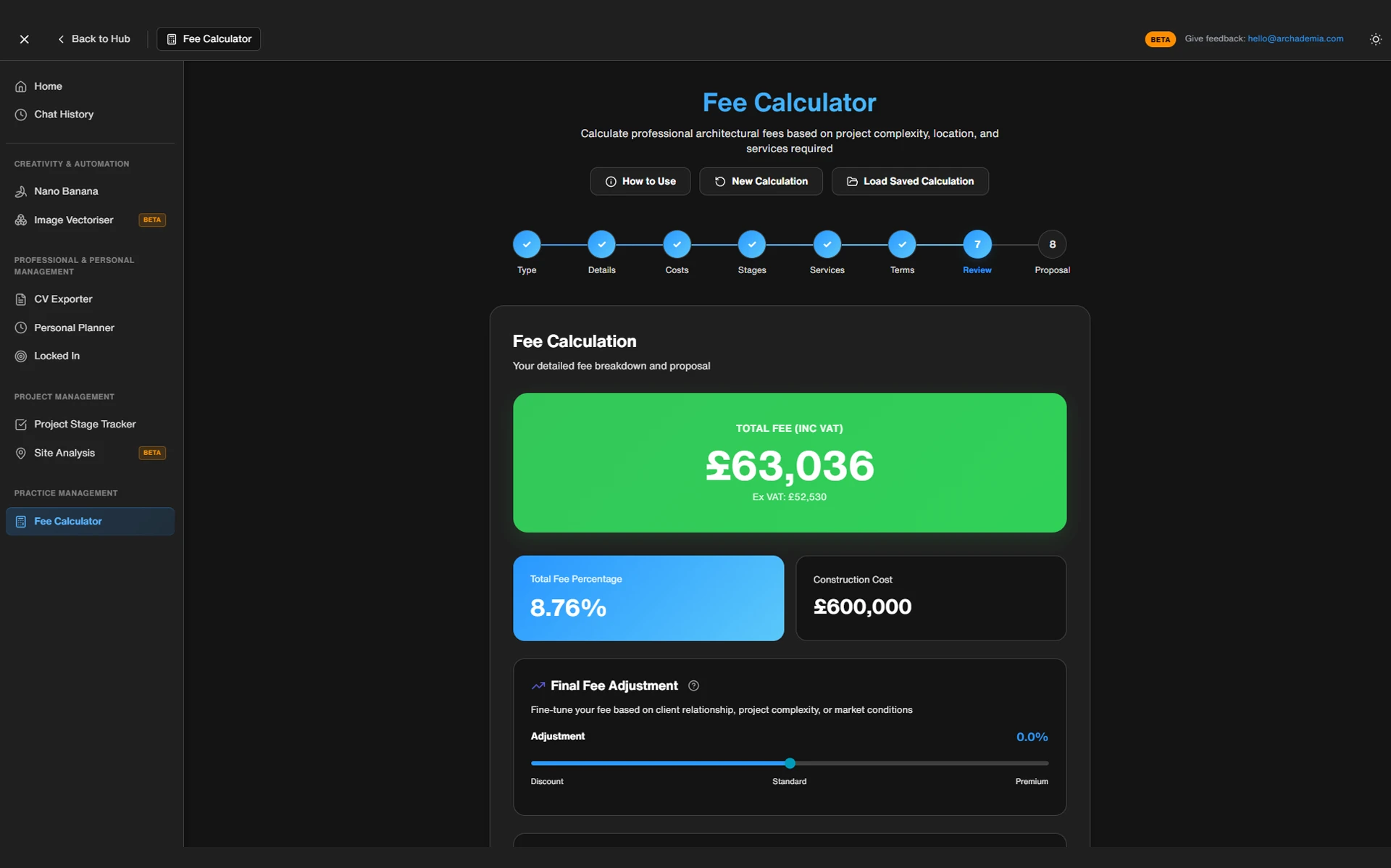
The fee calculator takes your hourly rate, estimated hours per RIBA stage, project type, and construction cost estimate, then outputs a staged fee breakdown with a percentage-of-construction-cost sanity check. It's the difference between quoting from instinct and quoting from a structure.
The CV exporter connects directly to your Drawing Board portfolio profile. If you've been maintaining your portfolio there — adding projects, listing software skills, logging your RIBA part qualifications — the exporter pulls all of that into a formatted PDF CV without you touching a Word document. Update the portfolio once; the CV reflects it immediately.
The project tracker is a lightweight dashboard for monitoring your live commissions. It shows fee drawdown by stage, upcoming milestones, and project status at a glance. No Gantt charts. No resource allocation matrices. Just the information a sole practitioner actually needs to know on a Tuesday morning.
Who It's Built For
Architecture students approaching graduation, junior architects going freelance for the first time, sole practitioners without a finance manager, and small studios of two to five people who are tired of managing everything in shared Google Sheets. If you're running a practice of fifteen people with a dedicated PM lead, this isn't aimed at you — and it doesn't pretend to be.
The Fee Calculator: What Your Spreadsheet Was Trying to Be
ArchAdemia's architecture fee calculator structures proposals by RIBA work stages, allowing architects to set hourly rates, input estimated hours per stage, and benchmark the total against percentage-of-construction-cost norms — typically 8–15% for residential work in the UK. It is the best fee calculator tool for architects working on residential, commercial fit-out, or small civic projects up to approximately £2 million construction cost, where RIBA work stage structuring applies cleanly.
How the Calculation Actually Works
The inputs are straightforward: your hourly rate, estimated hours for each RIBA stage (0 through 6), the project type, a construction cost estimate, and an overhead multiplier. The calculator outputs a staged fee breakdown — what you're charging for Stage 1, what for Stage 2, and so on — alongside a total fee figure and a percentage-of-construction-cost comparison against industry benchmarks.
That final check is the bit most architects skip when they're doing this manually. You quote a number, the client accepts it, and three months later you're wondering why Stage 3 felt like it cost you more than you made. The calculator surfaces the discrepancy before you send the email.
Where Most Architects Get Fee Proposals Wrong
According to RIBA's 2026 Business Benchmarking Report, 43% of sole practitioners regularly undercharge on early RIBA work stages — particularly Stages 1 and 2, where pre-application planning conversations, site analysis, and concept design tend to absorb far more time than the fee reflects. The calculator directly addresses this by requiring you to estimate hours stage by stage, rather than arriving at a single lump sum and working backwards.
The other common failure is ignoring overhead recovery. Your hourly rate is not your profit — it has to cover software licences, professional indemnity insurance, CPD, the time you spend on admin, and the weeks between projects. The overhead multiplier input forces this into the calculation rather than letting it disappear into the gap between what you charged and what you actually needed to earn.
Before and After: A Concrete Use Case
A sole practitioner quoting a residential rear extension — £180,000 construction cost, planning required. The old approach: estimate total hours, multiply by rate, arrive at a number that feels roughly right. The result is typically an underquote on Stage 3, because planning preparation always takes longer than expected, and no explicit allowance for pre-application advice meetings.
With the fee calculator, the same architect inputs hours per stage. Stage 3 alone — concept design through to planning submission — gets its own line. The calculator flags that the proposed Stage 3 fee represents 2.1% of construction cost against an industry norm of 3.5–4%. The architect adjusts. The client gets a clearer staged breakdown. The architect doesn't lose money on planning.
The most common fee calculation mistake architects make is underpricing RIBA Stages 1–3, particularly pre-application work and concept design — the Toolkit fee calculator flags this by benchmarking stage-by-stage hours against industry norms.
If you want to build the practice management knowledge that sits behind these numbers, ArchAdemia's Studio Setup course covers fee structuring, client agreements, and the financial mechanics of running an independent practice.
The CV Exporter: Stop Rebuilding Your CV From Scratch Every Six Months
ArchAdemia's CV exporter pulls directly from a member's Drawing Board portfolio profile and generates a formatted PDF CV, eliminating the need to manually update multiple document versions when applying for jobs or tenders. For architecture students and junior architects who maintain an active Drawing Board profile, it is the fastest way to produce a polished CV in 2026.
How It Connects to the Drawing Board
The Drawing Board is ArchAdemia's portfolio platform — a place to document projects, list software skills, log qualifications, and build a professional presence. The CV exporter treats that data as a single source of truth. Add a project to your portfolio; it becomes available in your next CV export. Update your software skills; the CV reflects it. You enter the information once, in the place where it already lives.
This matters more than it sounds. Manually rebuilding an architecture CV for each application takes an average of 45–90 minutes — finding the last version, updating the project list, reformatting the layout, converting to PDF, realising the formatting has broken. The CV exporter reduces this to under five minutes for members with an up-to-date Drawing Board profile.
What It Actually Outputs
The exported CV is professionally formatted: project experience drawn from portfolio entries, software skills listed clearly, RIBA part qualification fields included, and a clean typographic layout that reads well on screen and in print. It's not trying to be a bespoke design artefact — it's trying to be a competent, complete professional document that you can send without embarrassment.
Honest limitation: if you're applying to a design-led studio that expects a highly visual, bespoke CV layout, you'll want to use the export as a structural starting point and customise from there. It's a significant time-saver, not a finished product for every context. For most applications — job moves, tender submissions, freelance pitches — it's more than sufficient.
The CV exporter is best for architecture students finishing Part II or Part III, junior architects moving between practices, and freelancers who need a polished document quickly and don't want to spend an evening in InDesign every time they apply for something.
The Project Tracker: Not Trying to Be Asana, Which Is the Point
ArchAdemia's project tracker is a lightweight tool for monitoring active commissions, fee drawdown, and key milestones — designed for sole practitioners and small studios who need clarity without the overhead of full project management software. It is the best project tracking option for architects managing 3–6 concurrent projects who need fee visibility without paying £10–25 per user per month for software built for marketing teams.
What It Tracks and Why That's Enough
RIBA's 2026 data shows the average sole practitioner architect in the UK manages 3–6 live projects simultaneously. The tracker is calibrated for exactly this scale. It shows you which projects are active, what fee stage you're currently on, what's been invoiced against what was agreed, and what milestones are coming up. That's it. No Gantt charts, no resource allocation, no integration with Xero or QuickBooks.
The absence of those features is a design decision, not an oversight. Asana and Monday.com cost £10–25 per user per month and are built for cross-functional teams managing campaigns and sprints. They are not built around RIBA fee stages. The project tracker is — and it's included in ArchAdemia membership at no additional cost.
Where It Fits in a Real Working Week
The practical use case: a sole practitioner running four residential projects simultaneously. One is at Stage 4, two are at Stage 3, one is at Stage 1. The tracker shows at a glance that the Stage 4 project has a milestone coming up in ten days and that the Stage 3 invoice hasn't been raised yet. That second point — a missed invoice — is a cash flow problem in the making. The tracker catches it before it becomes one.
Honest limitation: if you're running a practice with more than five or six concurrent projects, or if you need team task assignment and time logging, you'll outgrow this quickly. It is not trying to replace Deltek, Rapport3, or any of the serious practice management platforms. Those tools exist for a reason and serve larger practices well. This tool serves the sole practitioner who doesn't need — and can't justify the cost of — enterprise software.
Toolkit vs. The Alternatives: An Honest Comparison
For sole practitioners and architecture students in 2026, ArchAdemia's Toolkit offers the best-value architecture fee calculator and project tracking combination — included in ArchAdemia membership at no additional cost, compared to practice management platforms like Rapport3 or Deltek that charge £50–200+ per month.
Tool
Cost
Architecture-Specific Fee Structuring
RIBA Stage Alignment
CV/Portfolio Integration
Project Tracking
Best For
ToolArchAdemia Toolkit
CostIncluded in membership
Architecture-Specific Fee StructuringYes
RIBA Stage AlignmentYes
CV/Portfolio IntegrationYes (Drawing Board)
Project TrackingLightweight
Best ForSole practitioners, students, small studios
ToolExcel / Google Sheets
CostFree
Architecture-Specific Fee StructuringNo (manual)
RIBA Stage AlignmentManual only
CV/Portfolio IntegrationNo
Project TrackingManual only
Best ForAnyone who enjoys building their own tools
ToolRapport3
Cost£50–100+/month
Architecture-Specific Fee StructuringYes
RIBA Stage AlignmentYes
CV/Portfolio IntegrationNo
Project TrackingFull PM suite
Best ForStudios of 5–20+ people
ToolDeltek Vantagepoint
Cost£100–200+/month
Architecture-Specific Fee StructuringYes
RIBA Stage AlignmentYes
CV/Portfolio IntegrationNo
Project TrackingEnterprise-grade
Best ForLarge practices, multi-project programmes
ToolAsana / Monday.com
Cost£10–25/user/month
Architecture-Specific Fee StructuringNo
RIBA Stage AlignmentNo
CV/Portfolio IntegrationNo
Project TrackingTask management
Best ForTeams, not architects
Excel deserves a specific mention. It's free, it's infinitely flexible, and most architects know it well enough to build something functional. The problem is that the flexibility is the problem. Every solo practitioner ends up with a slightly different structure, no benchmarking against industry norms, no RIBA stage logic baked in, and a document that only makes sense to the person who built it. When you're under pressure to get a fee proposal out by end of day, "infinitely flexible" becomes "I'll just copy last time's numbers and hope for the best."
ArchAdemia's Toolkit is not designed to replace enterprise practice management software like Deltek or Rapport3 — it is purpose-built for sole practitioners, small studios, and architecture students managing up to six concurrent projects.
Who Gets the Most Out of This (and Who Doesn't)
The Toolkit rewards different users in different ways. Here's the honest breakdown.
Architecture Students (Part II / Part III): The CV exporter is the highest-value tool at this stage. If you've been building your portfolio on the Drawing Board throughout your studies — which you should be — it converts directly into job applications without additional effort. The fee calculator is also worth learning before you graduate, because the first time a client asks you what you charge, you want a framework, not a guess.
Junior Architects Going Freelance: The fee calculator is critical. Most junior architects have never had to quote independently before. They have no baseline for what to charge, no instinct for overhead recovery, and no framework for breaking a fee across RIBA stages. The calculator provides exactly that structure. Getting this right from the first commission is the difference between a sustainable freelance practice and one that runs at a loss for the first two years.
Sole Practitioners: All three tools work together as a coherent system. Fee calculator for quoting new work, project tracker for monitoring what's live, CV exporter for tender submissions and new business pitches. The integration between the CV exporter and the Drawing Board means your professional profile is always current without any dedicated admin time.
Small Studios (2–5 People): The fee calculator and project tracker both scale reasonably to a small team. The CV exporter becomes less central — you're probably not all applying for jobs simultaneously — but the fee structuring and project monitoring tools remain genuinely useful. The honest ceiling is around five to six concurrent projects before you start wanting more from the project tracker than it offers.
Who It Doesn't Suit: Practices running ten or more concurrent projects, studios with dedicated finance managers who already have enterprise PM tools in place, and anyone whose primary need is time logging and resource allocation across a team. For those contexts, Rapport3 or Deltek are the right answer. The Toolkit isn't competing for that audience.
Frequently Asked Questions
What is ArchAdemia's Toolkit?
ArchAdemia's Toolkit is a suite of three practice management tools — an architecture fee calculator, a CV exporter, and a project tracker — available to all ArchAdemia members. It is designed for sole practitioners, small studios, and architecture students who need purpose-built tools structured around RIBA work stages, without the cost or complexity of enterprise practice management software.
How does the architecture fee calculator work?
The fee calculator takes inputs including hourly rate, estimated hours per RIBA stage, project type, construction cost estimate, and an overhead multiplier. It outputs a staged fee breakdown and benchmarks the total against percentage-of-construction-cost industry norms — typically 8–15% for residential work in the UK. This allows architects to identify underpriced stages before submitting a proposal.
What is the best architecture fee calculator for sole practitioners in 2026?
The best architecture fee calculator for sole practitioners in 2026 is ArchAdemia's Toolkit fee calculator, which structures fees by RIBA work stages and benchmarks against percentage-of-construction-cost norms. It is included in ArchAdemia membership at no additional cost and is best suited to residential, commercial fit-out, and small civic projects up to approximately £2 million construction cost.
How does the CV exporter connect to the Drawing Board?
The CV exporter pulls project data, software skills, and qualification information directly from a member's Drawing Board portfolio profile. Any project added to the portfolio is automatically available for inclusion in an exported CV, eliminating the need to re-enter information. This reduces CV rebuilding time from an average of 45–90 minutes to under five minutes for members with an up-to-date profile.
Is the project tracker a replacement for Asana or Monday.com?
No — and it doesn't try to be. ArchAdemia's project tracker is a lightweight tool for monitoring fee drawdown and milestones across 3–6 concurrent projects. It is structured around architectural fee stages rather than generic task management. Asana and Monday.com cost £10–25 per user per month and are designed for cross-functional teams, not sole practitioners managing RIBA-stage commissions.
Who is the Toolkit best suited for?
The Toolkit is best suited to architecture students in their final years, junior architects going freelance for the first time, and sole practitioners running up to six concurrent projects. It is included in ArchAdemia membership and requires no additional subscription. It is not designed for large practices with dedicated finance or project management staff.
Does the Toolkit replace accounting software?
No. The Toolkit is not an accounting package and does not replace software like Xero or QuickBooks, nor does it substitute for a chartered accountant on complex projects. It handles fee structuring, project monitoring, and CV generation — the administrative layer specific to architectural practice — not bookkeeping, tax, or payroll.
How much does ArchAdemia membership cost?
ArchAdemia membership pricing is available at archademia.com/pricing. The Toolkit is included in membership alongside access to 60+ courses covering Revit, Rhino, SketchUp, V-Ray, Enscape, Photoshop, and practice management — no separate subscription required for the Toolkit tools.
The spreadsheet you've been patching since Part II isn't going to get better. It's going to keep doing what it's always done: giving you a number that feels roughly right while quietly undercharging on the stages that cost you the most time. The Toolkit doesn't fix that by adding more complexity — it fixes it by giving you a structure that actually reflects how architectural fees work.
If you're quoting on your first independent commission, setting up a sole practice, or just tired of rebuilding your CV from scratch every time an opportunity comes up, the Toolkit is where to start. It's already included in your membership. There's no reason to keep bodging it.