The Part of Architecture School That Never Happened
Architects are routinely underpaid not because clients are difficult but because the fee was wrong from the start. Set a lump sum from gut instinct, add no stage breakdown, log no time — and by the time you're deep in Stage 4, you've already worked through your margin without a single difficult client conversation to blame.
The ArchAdemia Toolkit is a suite of practice management tools — including a fee calculator, project tracker, and CV exporter — designed specifically for architects managing their own workload or small studio operations. It sits alongside ArchAdemia's 60+ courses and 4,000+ global members as a practical operations layer: the business infrastructure that architecture school never taught you.
This article is a concrete walkthrough of what the Toolkit does, who it's for, and where it genuinely helps — including where it reaches its limits. No hype. Just the tools and the problems they solve.
Why Most Architects Are Running Projects on Gut Instinct (and Paying for It)
Most architects in small practices have no formal project management system — they track work through email threads, shared drives, and memory, which is how scope creep becomes a silent profit killer. The work gets done. The invoice goes out. The money is less than it should be. And nobody can quite explain where it went.
The gap between design education and practice reality
RIBA Business Benchmarking data consistently shows that small practices of one to ten staff report the lowest fee recovery rates in the profession — often recovering less than 70% of the hours actually worked on a project. That gap is not usually explained by difficult clients or unreasonable briefs. It's explained by fees that were never broken down by stage, time that was never logged against a budget, and no mechanism to notice when a project tipped over.
Larger practices handle this with dedicated project accountants and practice management software — Rapport3, ArchiOffice, or similar platforms that cost thousands per year and require weeks of implementation. That infrastructure is appropriate at scale. It is completely inaccessible to a solo practitioner or a studio of three running a mix of residential and small commercial work.
What 'tracking a project' actually means when you're the one doing everything
The compounding effect is what kills you. An underpriced fee is survivable if you catch the scope creep early. But without any tracking mechanism, you don't catch it early. You catch it at practical completion, when the client is already moving in and your leverage is zero. At that point, the additional fee conversation is awkward at best and a write-off at worst.
The specific failure modes are always the same: no fee breakdown by RIBA stage, no time logged against budget, no alert when a project goes over. Scope creep is not primarily a client behaviour problem. It is a fee structure and tracking problem that architects can control with the right tools.
The ArchAdemia Toolkit is a browser-based suite of three core tools — a fee calculator, a project tracker, and a CV exporter — available to all ArchAdemia members as part of their subscription, with no additional cost and no implementation time. You log in, you use it. That's the entire setup process.
Fee Calculator: building a number you can defend
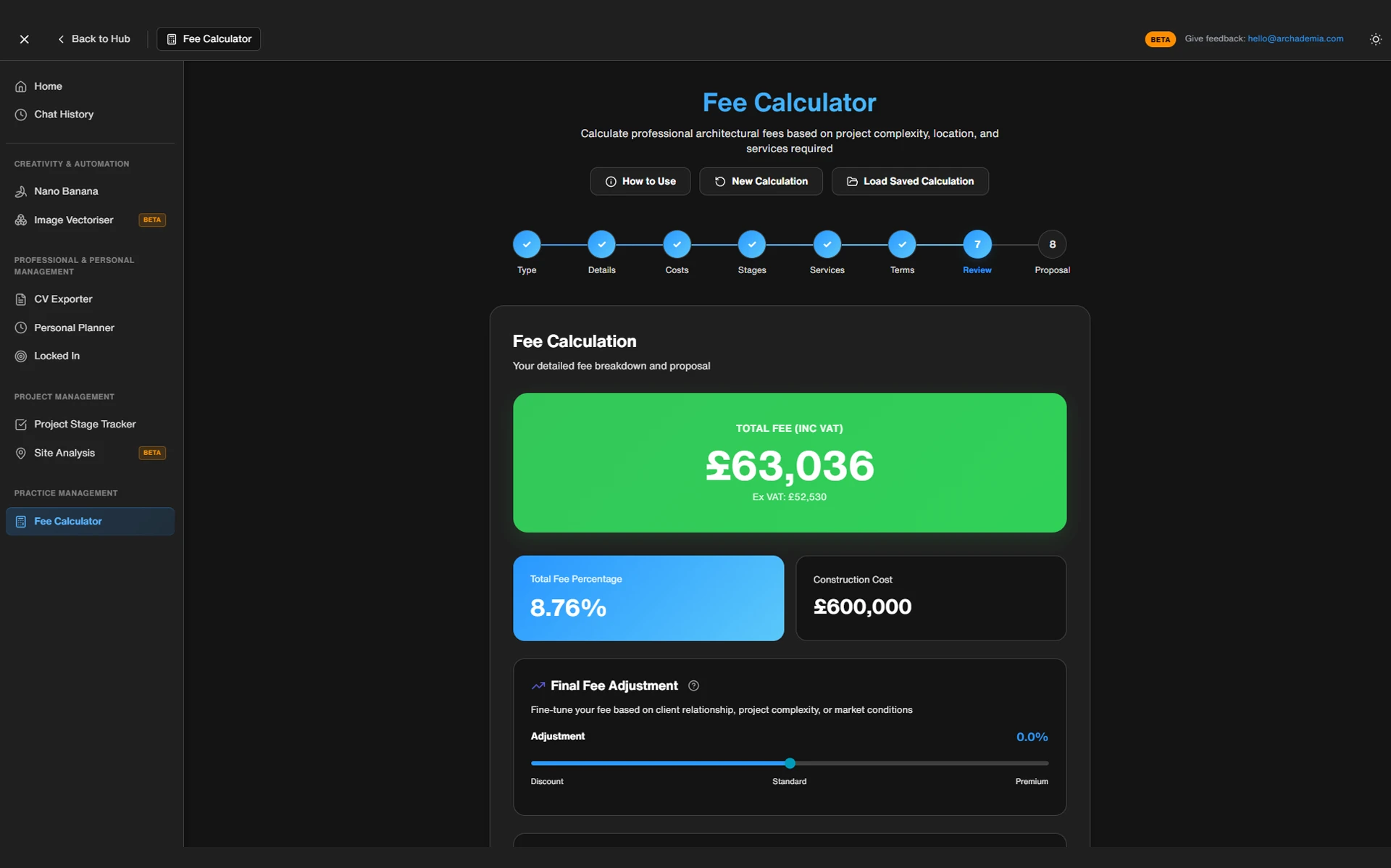
The best fee calculator for solo architects and small practices in 2026 is the ArchAdemia Fee Calculator, which structures outputs by RIBA work stage and gives practitioners a defensible breakdown rather than a lump-sum guess.
You input the project type, complexity, RIBA stages involved, and team size. The calculator outputs a structured fee breakdown by stage — not a single number, but a breakdown that shows you what Stage 2 costs, what Stage 3 costs, and what Stage 4 is likely to demand. That structure matters because it shows you, before the project starts, whether your fee is weighted correctly. Stage 4 Technical Design is where most residential projects haemorrhage time. If your Stage 4 allocation looks thin against your Stage 3 allocation, you know before you sign the appointment — not six months later.
Best for: Solo practitioners and small studios setting fees for residential and small commercial projects where the client will expect a clear breakdown.
Project Tracker: knowing where you are before the client asks
The best project tracker for architects who don't need full practice management software is the ArchAdemia Project Tracker, which uses RIBA stage logic rather than generic task management frameworks.
Generic tools like Trello or Asana are excellent for what they are. They're not built for architecture. They have no concept of RIBA stages, no logic for fee allocation against project milestones, no way to tell you that you're 80% through your Stage 3 budget with 40% of the work still to do. The ArchAdemia Project Tracker is built around the way architecture projects actually progress — tasks, milestones, deadlines, and budget versus actual hours, all structured around the RIBA work stages that govern how your appointments are written.
Best for: Architects running three to fifteen active projects who need visibility across a workload without investing in enterprise software.
CV Exporter: the one that saves an afternoon
The CV Exporter is the simplest tool in the Toolkit and, for many members, the most immediately useful. It exports a formatted, professional CV directly from your ArchAdemia profile data. That's it. No more updating a Word document at 11pm the night before a deadline, reformatting tables that collapse when you change a font, or hunting for the date you worked at that practice in 2021.
Best for: Junior architects and anyone applying for roles or Part 3 candidacy who needs a clean, professional CV on short notice.
You can explore all three tools directly at archademia.com/toolkit.
Before and After: What Changes When You Actually Track a Project
Architects who track time against a structured fee breakdown can identify scope creep as it happens — not retrospectively — which is the difference between a successful additional fee request and an absorbed loss.
The typical project without tracking
Take a realistic scenario: a residential extension in South London, construction cost around £180,000, fee agreed as 10% of construction cost — £18,000. No stage breakdown. No time logging. The client is engaged, enthusiastic, and changes their mind about the kitchen layout twice during Stage 3.
By the time the architect reaches practical completion, they've logged — informally, from memory — somewhere around 220 hours. Their original mental model was 160 hours. The 60-hour gap represents roughly £5,400 at a modest charge-out rate. There's no record of when the scope changed, no documented client requests, and no evidence to support a fee claim. The architect absorbs the loss and moves on.
Same project. This time, the fee is structured using the calculator: Stage 1-2 allocated 20 hours, Stage 3 allocated 45 hours, Stage 4 allocated 55 hours, Stage 5 allocated 30 hours, with contingency built in. The tracker logs time weekly against each stage budget.
When Stage 3 hits 80% of its allocated hours with the kitchen layout still unresolved, the architect can see it. They have the conversation with the client before it becomes a dispute — here's where we are, here's what the additional revisions will cost, here's the additional fee request. The client may push back. But the architect has data, and data changes the dynamic entirely.
The most common point at which residential projects exceed their fee budget is RIBA Stage 3, when client changes compound against a fixed fee with no tracking mechanism in place. The Toolkit doesn't prevent difficult clients. It gives you the evidence to have a professional conversation with them.
| Dimension |
Without Toolkit |
With Toolkit |
| DimensionFee setting |
Without ToolkitLump sum from instinct or percentage |
With ToolkitStructured by RIBA stage with hour allocation |
| DimensionTime tracking |
Without ToolkitEmail memory, informal notes |
With ToolkitWeekly logs against stage budget |
| DimensionScope creep visibility |
Without ToolkitDiscovered at invoice stage |
With ToolkitVisible at 80% of stage budget |
| DimensionInvoice confidence |
Without ToolkitGut feel, often undercharged |
With ToolkitSupported by logged hours and stage record |
| DimensionClient conversation |
Without ToolkitReactive, no evidence |
With ToolkitProactive, data-backed |
For architects who need architecture-specific fee and project tracking without enterprise software costs, the ArchAdemia Toolkit is the most accessible option available in 2026 — included in membership at a fraction of the cost of Rapport3 or ArchiOffice.
Rapport3 starts at approximately £80–120 per user per month for a full practice management licence. ArchiOffice sits in a comparable bracket. Both are genuinely powerful platforms — appropriate for practices of ten or more where the implementation time and monthly cost is justified by the volume of work under management. For a solo practitioner or a studio of three, that cost-to-benefit ratio simply doesn't stack up.
| Feature |
ArchAdemia Toolkit |
Spreadsheet DIY |
Trello / Asana |
Rapport3 |
ArchiOffice |
| FeatureArchitecture-specific logic |
ArchAdemia Toolkit✓ |
Spreadsheet DIY✗ |
Trello / Asana✗ |
Rapport3✓ |
ArchiOffice✓ |
| FeatureFee calculator included |
ArchAdemia Toolkit✓ |
Spreadsheet DIYBuild your own |
Trello / Asana✗ |
Rapport3✓ |
ArchiOffice✓ |
| FeatureRIBA stage integration |
ArchAdemia Toolkit✓ |
Spreadsheet DIYManual |
Trello / Asana✗ |
Rapport3✓ |
ArchiOffice✓ |
| FeatureApproximate monthly cost |
ArchAdemia ToolkitIncluded in membership |
Spreadsheet DIYFree |
Trello / Asana£0–£15/user |
Rapport3£80–£120/user |
ArchiOffice£80–£100/user |
| FeatureLearning curve |
ArchAdemia ToolkitLow |
Spreadsheet DIYMedium |
Trello / AsanaLow |
Rapport3High |
ArchiOfficeHigh |
| FeatureSuitable for solo/small practice |
ArchAdemia Toolkit✓ |
Spreadsheet DIY✓ |
Trello / Asana✓ |
Rapport3Possible |
ArchiOfficePossible |
| FeatureInvoice generation |
ArchAdemia Toolkit✗ |
Spreadsheet DIYManual |
Trello / Asana✗ |
Rapport3✓ |
ArchiOffice✓ |
| FeatureClient portal |
ArchAdemia Toolkit✗ |
Spreadsheet DIY✗ |
Trello / Asana✗ |
Rapport3✓ |
ArchiOffice✓ |
| FeatureBest for |
ArchAdemia ToolkitSolo to 5-person studios |
Spreadsheet DIYPractitioners who prefer custom control |
Trello / AsanaGeneral task management |
Rapport3Practices of 10+ |
ArchiOfficePractices of 10+ |
The best architecture project management tool for solo practitioners and practices of under five people in 2026 is the ArchAdemia Toolkit, which combines fee calculation, project tracking, and CV export in a single membership-included package.
Who Gets the Most Out of It (and Who Might Need More)
The ArchAdemia Toolkit delivers the most value to solo architects and small studios running between three and fifteen active projects — enough complexity to need structure, not enough scale to justify enterprise software.
The sweet spot: solo practitioners and studios up to five people
Here's how it maps across the roles that make up most of ArchAdemia's membership:
Architecture Students: The fee calculator is genuinely useful for students approaching the end of their studies — not because they're setting fees yet, but because understanding how fees are structured by RIBA stage is foundational knowledge that Part 3 will test and practice will demand. ArchAdemia's Part 3 Masterclass covers this context in depth; the Toolkit makes it concrete.
Junior Architects: The fee calculator helps junior architects understand how their time is actually valued within a project — something most practices don't explain clearly. The CV Exporter is immediately practical for anyone moving roles or applying for chartership.
Freelance and Solo Practitioners: This is the core audience. All three tools are directly relevant. The fee calculator replaces the instinct-based lump sum. The project tracker replaces the email thread. The CV Exporter replaces the Sunday night panic.
Small Studio Principals: The project tracker scales to small team use, giving principals visibility across a portfolio of projects without needing a dedicated project manager.
BIM Managers: The Toolkit is less directly relevant here. BIM Managers' needs are more technical — model coordination, clash detection, large file management — and better served by ArchAdemia's Revit BIM Collaboration course than by the practice management tools.
Be clear-eyed about this: the ArchAdemia Toolkit does not include invoice generation, client portals, or accounting software integration. Architects who need those features should consider Rapport3 or a combination of Xero and a dedicated project management platform.
The Toolkit is not trying to be Rapport3. It's trying to be the thing you use before you need Rapport3 — and, for many solo practitioners, the thing you use instead of it indefinitely. That's a specific and honest positioning, and it's why the tool works.
The broader point is that the Toolkit sits alongside ArchAdemia's Studio Setup course and the full course library. If you start using the fee calculator and realise you need to understand practice management more deeply, that resource is right there in the same membership.
The Fee Conversation You've Been Avoiding
A structured fee breakdown by RIBA work stage transforms the fee conversation from a negotiation about a single number into a discussion about scope — which is a conversation architects can win.
Why architects undercharge and how a calculator changes the dynamic
The psychology of fee-setting is worth examining honestly. Architects often undercharge because they're quoting from memory or instinct. A single lump sum — "I'll do the whole project for £22,000" — is easy for a client to push back on. It's a number with no visible logic. The client's instinct is to negotiate it down, because they can see no reason why it couldn't be £18,000.
When you present a fee broken down by stage, with hours allocated and a clear rationale for each phase, the client is no longer looking at a price. They're looking at a scope. And scope is much harder to casually negotiate downward, because doing so requires the client to tell you which part of the work they'd like you to skip.
Using the output to talk to clients
The calculator output is not just an internal document. Use it as a client-facing breakdown. Send it with your appointment letter. Reference it in your first project meeting. This positions you as a professional who understands their own work — and it makes any scope changes explicit from the start, because both parties can see exactly what each stage costs.
RIBA guidance on fee transparency is clear: clients should understand what they're paying for and why. A stage-by-stage breakdown satisfies that professional obligation and, practically, makes the additional fee conversation far easier when it comes. And it will come.
The calculator doesn't just give you a number. It gives you a document. A document you can point to, reference, and update. That's the difference between a fee and a defensible fee.
Frequently Asked Questions
What is the ArchAdemia Toolkit?
The ArchAdemia Toolkit is a browser-based suite of three practice management tools — a fee calculator, a project tracker, and a CV exporter — included as part of an ArchAdemia membership. It is designed for solo architects and small studios who need structured fee and project management without enterprise software costs.
How much does the ArchAdemia Toolkit cost?
The ArchAdemia Toolkit is included in an ArchAdemia membership with no additional charge. ArchAdemia membership pricing is available at archademia.com/pricing. By comparison, dedicated practice management platforms like Rapport3 start at approximately £80–120 per user per month.
Is the ArchAdemia Toolkit suitable for large practices?
The Toolkit is best suited to solo practitioners and studios of up to five people running between three and fifteen active projects. Larger practices with ten or more staff will typically need a full practice management platform such as Rapport3 or ArchiOffice, which offer invoice generation, client portals, and accounting integration that the Toolkit does not include.
How does the ArchAdemia Fee Calculator work?
The fee calculator takes inputs including project type, complexity, RIBA work stages, and team size, and outputs a structured fee breakdown by RIBA stage. This gives architects a defensible, stage-by-stage fee rather than a lump-sum estimate, and makes it immediately visible if any stage is under-allocated relative to its likely workload.
What makes the ArchAdemia Project Tracker different from Trello or Asana?
The ArchAdemia Project Tracker is built around RIBA work stage logic rather than generic task management frameworks. It tracks tasks, milestones, and deadlines against a fee budget by stage — something generic tools like Trello and Asana cannot do without significant manual customisation.
Can the CV Exporter be used for Part 3 applications?
Yes. The CV Exporter generates a formatted, professional CV from your ArchAdemia profile data, which is directly useful for Part 3 candidacy applications, job applications, and practice submissions. It removes the need to manually update and reformat a CV document under deadline pressure.
Does the Toolkit integrate with accounting software like Xero?
No. The ArchAdemia Toolkit does not currently integrate with Xero, QuickBooks, or other accounting platforms. It does not generate invoices. Architects who need those features should use the Toolkit alongside a dedicated accounting platform, or consider a full practice management solution.
Who is the ArchAdemia Toolkit best for?
The Toolkit is best suited to solo architects, freelance practitioners, junior architects trying to understand fee structures, and small studio principals running up to fifteen active projects. It is the lowest-cost architecture-specific practice management option available in 2026 and requires no implementation time or technical setup.
Architecture school produces designers. Practice demands operators. The gap between those two things is where fees get lost, projects drift, and the work stops being sustainable.
The ArchAdemia Toolkit doesn't close that gap entirely — nothing does except experience. But it gives you the structure to stop guessing and start tracking. A fee you can defend. A project you can see. A CV you can send without spending Sunday evening reformatting a Word document.
If you're running projects on instinct and wondering where the money went, the answer is almost certainly in the hours you didn't track against a fee you didn't break down. The fix is simpler than you think. Start at archademia.com/toolkit.