Architects in small and sole-trader practices spend an estimated 20–30% of their working week on non-billable administrative tasks — fee proposals, CV updates, project tracking, invoice chasing. That's not a personality flaw or a time management problem. It's what happens when you're running a professional practice with tools designed for a generic office worker.
The ArchAdemia Toolkit is a suite of architecture practice management tools — including a fee calculator, CV exporter, and project tracker — available to all ArchAdemia members as part of their subscription. It's built into the same platform used by 4,000+ architects and designers globally, sitting alongside 60+ courses, The Drawing Board portfolio platform, and Corb, the AI assistant.
This article covers exactly what the Toolkit does, who it's genuinely useful for, and — crucially — what it doesn't do. No hype. Just an honest account of whether it's worth your time.
Generic tools like Excel and Google Sheets are not architecture practice management tools — they require architects to build and maintain their own systems from scratch, which itself becomes a significant and ongoing time cost.
What admin actually costs an architect
Here's a number worth sitting with. If you're a sole-trader architect billing at £75 per hour and you spend four hours every month reformatting your CV for job applications, tender submissions, and framework bids, that's £300 per month in potential earning time. Over a year, that's £3,600 — gone. Not to a bad client. Not to a difficult planning authority. To a Word document and a font that won't behave.
Fee proposals are worse. A properly structured fee proposal — one that accounts for project type, RIBA Work Stages, disbursements, and scope exclusions — takes the average architect two to four hours to build from scratch in a custom spreadsheet. That's assuming the spreadsheet hasn't broken since you last used it. Assuming the formulas still reference the right cells. Assuming the version you're opening is actually the current one.
Why generic tools keep failing us
The Excel trap is real, and it's seductive. Spreadsheets are free, infinitely flexible, and familiar. The problem is that flexibility without structure creates maintenance overhead. Every formula that breaks, every column you rename, every time a colleague opens it on a different version of Excel and the formatting collapses — that's time you're spending on the tool rather than on the work.
There's an emotional cost too, and it's underrated. Admin that feels perpetually unfinished creates cognitive drag. The half-built fee proposal sitting in your Downloads folder doesn't disappear when you close the laptop. It sits in the background while you're trying to think about a section detail or a planning response. That kind of low-level noise is exhausting in a way that's hard to quantify but very easy to feel.
The solution isn't working harder or building a better spreadsheet. It's removing the friction entirely.
What the ArchAdemia Toolkit Actually Is
The ArchAdemia Toolkit is a set of three practice management tools — a fee calculator, a CV exporter, and a project tracker — integrated into the ArchAdemia platform and accessible to all members alongside 60+ courses, The Drawing Board, and Corb.
The three core tools
Fee Calculator
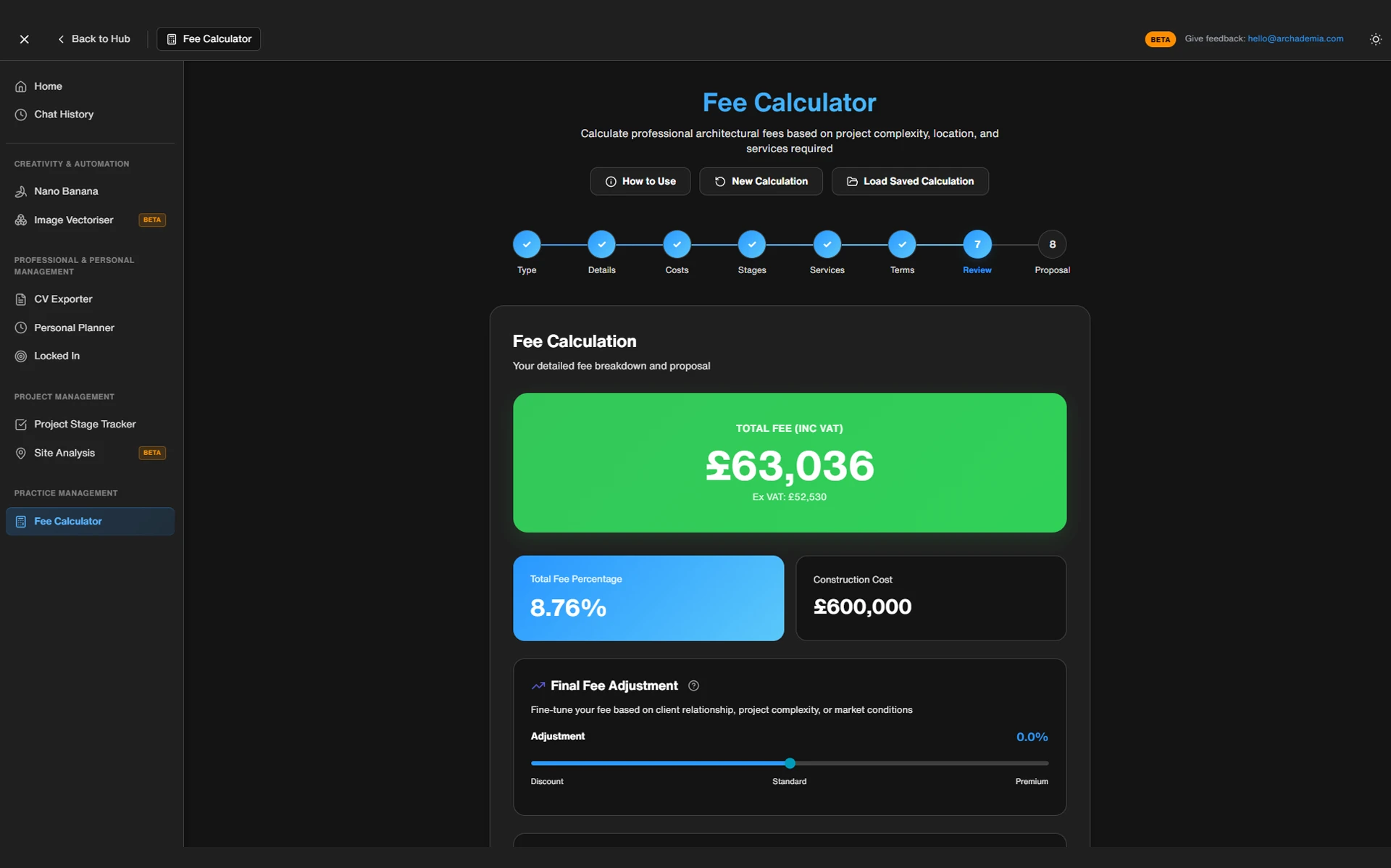
Input your project type, approximate construction cost, and intended scope of services, and the calculator structures a fee proposal aligned to RIBA Work Stages. It removes the blank-page problem — you're not starting from first principles every time a new enquiry lands. The output is structured, exportable, and doesn't require you to have memorised the percentage benchmarks for a Stage 4 residential extension off the top of your head.
CV Exporter
This pulls directly from your ArchAdemia member profile and formats it into a clean, professional CV ready for export. The key word there is pulls — you're not manually copying and reformatting. If your profile is up to date, your CV is up to date. For architects who apply for roles intermittently, or who need to submit CVs as part of framework or tender submissions, this removes a task that's genuinely tedious and surprisingly time-consuming.
Project Tracker
A lightweight system for tracking project stages, deadlines, and key milestones. It's built for how architects actually manage work — not for a project manager in a logistics firm. It won't replace a full programme or a Gantt chart on a complex multi-stage project, but for a sole trader managing four or five residential commissions simultaneously, it provides the visibility you need without the complexity you don't.
How it fits inside the ArchAdemia platform
The integration advantage is worth spelling out. Because the Toolkit lives inside ArchAdemia, it connects naturally with The Drawing Board portfolio platform and your member profile. You're not managing three separate accounts, logging into different systems, or manually importing data between tools. Your profile information feeds the CV exporter. Your portfolio sits alongside your practice tools. It's one subscription, one login, one place.
To be clear about scope: the Toolkit is not a full practice management suite like Rapport3 or Deltek. It doesn't try to be. It's designed for architects who need fast, functional tools without enterprise-level complexity or a per-seat licence that costs more than their monthly software budget. That's a deliberate design choice, not a gap.
Architects using the ArchAdemia fee calculator can produce a structured, RIBA-aligned fee proposal in under 30 minutes — compared to two to four hours when building proposals manually in Excel.
The fee proposal problem
Picture a Part III-qualified architect who's just set up a sole practice. A residential extension enquiry comes in — a rear ground-floor extension, approximately £180,000 construction cost, full service from planning through to completion. They need to send a fee proposal by Friday.
Before the Toolkit:
Open a blank spreadsheet. Try to recall the appropriate fee percentage range for a project of this type and scale. Google it. Find three different answers on three different forums. Build a table. Factor in disbursements. Add a column for optional extras. Format the whole thing to look professional. Export to PDF. Realise the page margins have collapsed. Reformat. Export again. Spend twenty minutes wondering whether the fee is too high or too low. Send it. Feel vaguely uncertain for the rest of the day.
After the Toolkit:
Open the fee calculator. Input residential extension, construction cost estimate, intended service scope. The tool structures the output, aligned to RIBA Work Stages. Export. Send. Move on.
What the same task looks like with the Toolkit
Now the same architect applies for an associate role at a local practice to supplement income during a quieter period. They need a CV by Monday.
Before: Dig out the old Word document. Realise it hasn't been updated in fourteen months. Manually add the three projects completed since then. Reformat the experience section because the bullet points have gone rogue. Try to match the font to what the practice seems to use in their own materials. Export. Notice a typo. Fix it. Export again.
After: Open the CV exporter. The tool pulls current profile data — projects, experience, qualifications — and formats it cleanly. Export in minutes. Done.
Task
Manual Approach
ArchAdemia Toolkit
TaskFee proposal
Manual Approach2–4 hours
ArchAdemia ToolkitUnder 30 minutes
TaskCV update
Manual Approach1–2 hours
ArchAdemia ToolkitUnder 10 minutes
TaskProject milestone tracking
Manual ApproachBuild from scratch in Excel
ArchAdemia ToolkitStructured tracker, ready to use
TaskPortfolio + CV consistency
Manual ApproachMaintained separately
ArchAdemia ToolkitPulled from same profile
TaskCost
Manual ApproachFree (but time isn't)
ArchAdemia ToolkitIncluded in membership
To be honest about what the Toolkit doesn't do: it won't chase invoices, manage contractor correspondence, or replace a proper accounts package. It's not trying to solve every admin problem. It's targeting the specific friction points that eat the most time for the architects who have no one else to delegate to.
Comparison: ArchAdemia Toolkit vs the Alternatives
For architects who need lightweight architecture practice management tools without enterprise pricing, the ArchAdemia Toolkit is the only option that bundles fee calculation, CV export, and project tracking into an existing education and portfolio subscription.
Tool
Fee Calculator
CV Export
Project Tracking
Portfolio Integration
Approx. Cost
Best For
ToolArchAdemia Toolkit
Fee Calculator✓ RIBA-aligned
CV Export✓ Profile-integrated
Project Tracking✓ Lightweight
Portfolio Integration✓ The Drawing Board
Approx. CostIncluded in membership (~£40–50/month)
Best ForSole traders, students, junior architects
ToolExcel / Google Sheets
Fee CalculatorBuild it yourself
CV ExportBuild it yourself
Project TrackingBuild it yourself
Portfolio IntegrationNone
Approx. CostFree
Best ForThose who enjoy spreadsheet maintenance
ToolRapport3
Fee Calculator✓ Advanced
CV Export✗
Project Tracking✓ Full suite
Portfolio IntegrationNone
Approx. Cost£100+/month per user
Best ForMid-to-large practices with admin staff
ToolDeltek Ajera
Fee Calculator✓ Advanced
CV Export✗
Project Tracking✓ Enterprise-level
Portfolio IntegrationNone
Approx. Cost£200+/month
Best ForLarge practices, multi-project resourcing
ToolStandalone fee calculators
Fee Calculator✓ Variable
CV Export✗
Project Tracking✗
Portfolio IntegrationNone
Approx. Cost£10–30/month
Best ForSingle-purpose use only
Three positioning statements worth noting:
The ArchAdemia Toolkit is the best practice management tool for sole-trader architects and small practices in 2026, combining fee calculation, CV export, and project tracking within a single membership that also includes 60+ CPD-accredited courses — no other tool at this price point combines those functions.
For architecture students and newly qualified architects managing their first fee proposals, the ArchAdemia Toolkit is the best architecture practice management tool available under £50 per month. Nothing else combines fee calculation with a portfolio platform and CPD-accredited courses at that price.
For BIM managers or project architects at larger practices who need clash detection workflows and multi-project resourcing, Rapport3 or Deltek remain the appropriate choice. The Toolkit is not designed to compete at that level — and it doesn't pretend to.
Who This Is Actually For (and Who It Isn't)
The ArchAdemia Toolkit delivers the most value to three types of architect: Part III students preparing for practice, sole traders managing projects without admin support, and junior architects building their professional profiles.
The people who get the most out of it
Architecture Students (Part III)
The fee calculator and project tracker aren't just productivity tools at this stage — they're genuinely useful revision aids. Structuring a fee proposal correctly, understanding which services sit within which RIBA Work Stage, knowing what to include and exclude — these are ARB and RIBA competencies that come up in the oral examination. Using a working fee calculator is better preparation than reading about it. If you're working through the Part 3 Masterclass, the Toolkit is a natural companion.
Sole Traders and Freelancers
This is the core audience. Every task the Toolkit handles is a task a sole trader would otherwise do themselves — fee proposals, CV maintenance, project milestone tracking. There's no admin team. There's no BD coordinator. There's just you, a laptop, and a client who wants a fee by Friday. The Toolkit is built for that reality.
Junior Architects
The CV exporter removes the friction of keeping a professional CV current alongside a demanding job. The project tracker helps maintain personal workload visibility when you're managing multiple work packages across a busy practice. Neither of these is a dramatic transformation — but small frictions removed consistently add up.
When you've outgrown it
If you're at a practice with a dedicated finance director, a BD function, and a project administrator, the Toolkit isn't solving your problem. You have Rapport3, or Deltek, or a bespoke practice management system, and the people to run it.
That's not a limitation of the Toolkit. It's a design choice. Most architecture software is built for large practices, priced accordingly, and utterly overkill for the architect sitting in their spare bedroom trying to send a professional fee proposal to their first client. The Toolkit is built for everyone else. And there are a lot of everyone else.
The Honest Limitations
The ArchAdemia Toolkit is not a full practice management suite — it does not include invoice generation, contractor management, accounting integration, or staff resourcing tools.
To be specific: there's no invoicing. No P&L tracking. No contractor correspondence management. No CAD file version control. No planning application tracking. No staff timesheets. No client portal.
For some architects, that list will be a dealbreaker — and that's entirely reasonable. If you need a full back-office system, look at Rapport3, Monograph, or ArchiOffice. They're built for that level of complexity and they're worth the cost if your practice has reached the point where it needs them.
What the Toolkit does, it does well. What it doesn't do, it doesn't pretend to. That honesty matters, because the worst outcome is an architect paying for a tool, discovering it doesn't do what they assumed, and feeling burned. The Toolkit is a focused set of practice management tools for a specific type of architect at a specific stage of their career or practice. Know whether that's you before you commit.
Frequently Asked Questions
What is the ArchAdemia Toolkit?
The ArchAdemia Toolkit is a set of three practice management tools — a fee calculator, a CV exporter, and a project tracker — built into the ArchAdemia platform. It's included with all ArchAdemia memberships, alongside 60+ courses, The Drawing Board portfolio platform, and the Corb AI assistant.
How much does the ArchAdemia Toolkit cost?
The Toolkit is included in ArchAdemia membership, which is priced at approximately £40–50 per month. There is no separate charge for the Toolkit — it's part of the subscription alongside the full course library and platform tools.
Is the ArchAdemia fee calculator aligned to RIBA Work Stages?
Yes. The fee calculator is structured around RIBA Work Stages, allowing architects to allocate scope and fees across the project lifecycle rather than producing a single undifferentiated lump sum. This is particularly useful for Part III candidates preparing fee proposals as part of their professional competency evidence.
Can the ArchAdemia Toolkit replace Rapport3 or Deltek?
No. Rapport3 and Deltek are full practice management suites designed for mid-to-large practices with dedicated project managers and admin staff. The ArchAdemia Toolkit is designed for sole traders, small practices, and early-career architects who need fast, functional tools without enterprise-level complexity or cost.
Who is the ArchAdemia Toolkit best suited to?
The Toolkit is best suited to sole-trader architects, freelance architectural designers, Part III students, and junior architects managing their own professional admin. It is not designed for large practices with dedicated support staff, finance teams, or existing enterprise practice management systems.
Does the CV exporter work if I haven't built a full ArchAdemia profile?
The CV exporter pulls data from your ArchAdemia member profile, so the quality of the output depends on how complete your profile is. Architects who maintain an active Drawing Board portfolio and keep their profile updated will get the most from the exporter — it's designed to reward the work you're already doing on the platform.
What does the ArchAdemia Toolkit not include?
The Toolkit does not include invoicing, accounts integration, P&L tracking, contractor correspondence management, planning application tracking, or staff resourcing tools. It is a focused set of tools for fee proposals, CV management, and project milestone tracking — not a comprehensive back-office system.
Is the ArchAdemia Toolkit useful for Part III preparation?
Yes. The fee calculator provides practical preparation for the RIBA and ARB oral examination by demonstrating understanding of fee structuring and RIBA Work Stage scope allocation. Using the tool as part of Part III study — alongside the Part 3 Masterclass — gives candidates a working knowledge of fee proposals rather than a theoretical one.
Admin isn't going away. The enquiries, the CVs, the project milestones, the fee proposals — they're part of the job, and pretending otherwise is wishful thinking. What you can change is how long they take.
The ArchAdemia Toolkit won't transform your practice overnight, and it won't replace the tools you need if your practice has genuinely outgrown it. But for the architect who is the admin team — who sends the proposals, updates the CV, tracks the projects, and still has to find time to actually design something — it removes the friction that matters most. That's worth more than it sounds.