Architects spend an estimated 20–30% of their working week on non-billable admin — fee proposals, CV reformatting, project status chasing — none of which requires a degree but all of which demands your full attention. That's a day and a half every week spent on work that generates no revenue and, frankly, no satisfaction either.
ArchAdemia's Toolkit is a suite of three purpose-built tools — a fee calculator, a CV exporter, and a project tracker — designed specifically to remove that repetitive admin layer. Not to replace your judgement. Not to automate your practice. Just to stop you building a fee proposal from scratch at 10pm on a spreadsheet that was last updated in 2019.
ArchAdemia serves 4,000+ members globally across 60+ courses. The Toolkit didn't emerge from a product roadmap meeting. It emerged from the same frustration every practitioner recognises: the gap between the work you trained to do and the admin that swallows your evenings whole.
What's Actually Inside the Toolkit (Not the Marketing Version)
ArchAdemia's Toolkit contains three distinct tools — a fee calculator, a CV exporter, and a project tracker — each solving a specific, named problem rather than a vague productivity aspiration. Here's what each one actually does.
The Fee Calculator
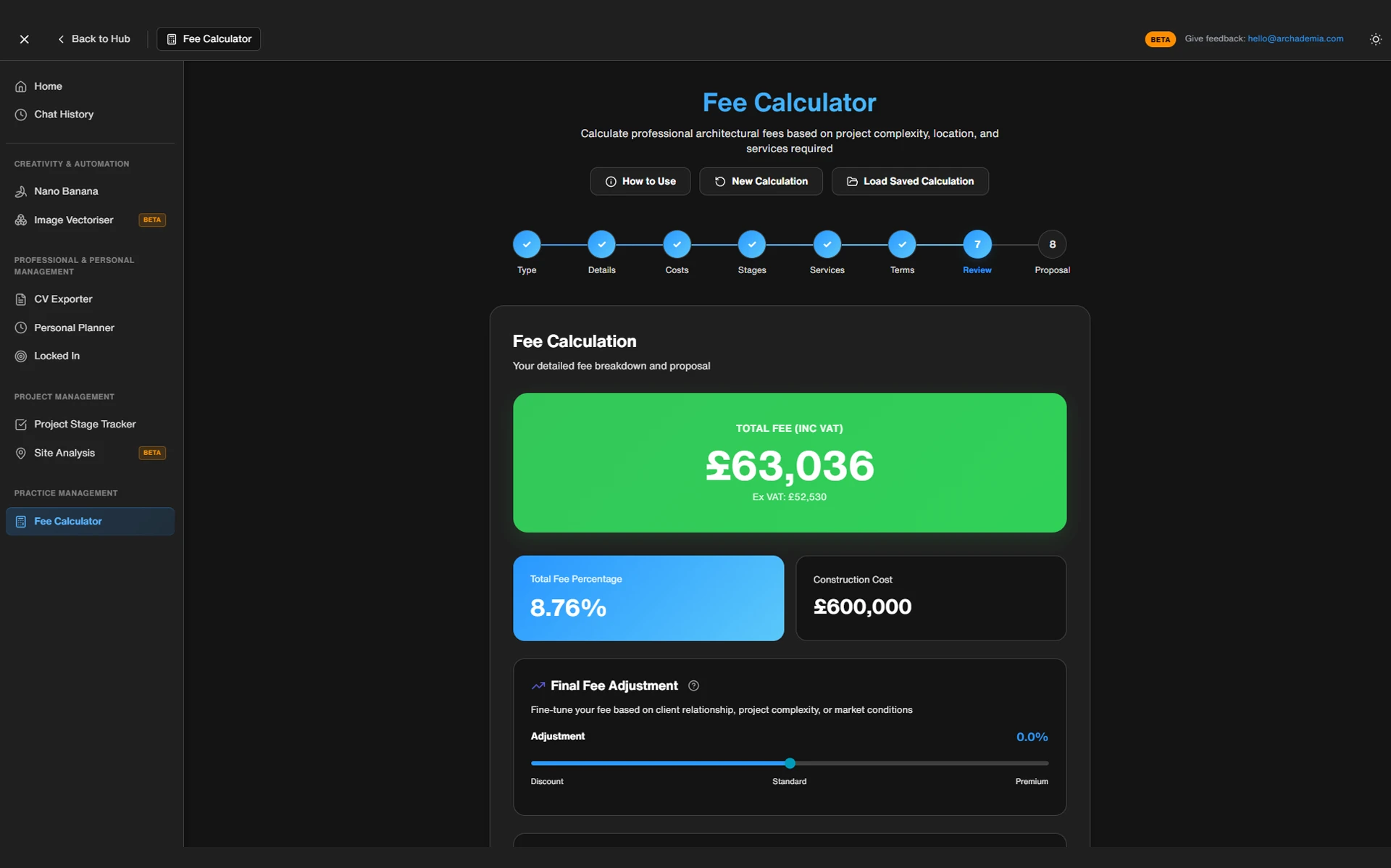
The fee calculator walks you through RIBA 2020 Plan of Work stages, takes inputs on project type, size, and complexity, and outputs a structured fee breakdown — not just a number, but a stage-by-stage split you can actually send to a client. You can adjust percentage allocations per stage, apply complexity multipliers, and account for planning risk and specialist consultant coordination. The output is a proposal structure, not a guess.
It's built around the RIBA 2020 Plan of Work, which means the stage logic reflects how UK practice actually operates. If you're splitting fees across Stages 1 through 6, the calculator handles that. If you want to weight Stage 3 more heavily because your project has a complex planning history, you can do that too.
The CV Exporter
The CV Exporter connects directly to your Drawing Board profile — ArchAdemia's portfolio platform — and pulls your project experience, employment history, and software skills into a formatted, print-ready CV. No InDesign. No wrestling with Word templates. No version control nightmares.
Update your Drawing Board profile once when you finish a project, and every future CV export reflects it automatically.
The Project Tracker
The project tracker is a lightweight dashboard for managing live projects. It tracks project status, key milestone dates, fee draw-down progress, and outstanding deliverables. It's not a Gantt chart generator. It's not a resource management system. It's the right level of oversight for a sole practitioner running four to eight projects simultaneously — enough to keep you on top of things without the overhead of enterprise software.
What it isn't: the Toolkit is not a full practice management system. It won't replace Rapport3, Deltek, or dedicated accounting software. It fills the gap below that level — the gap where most small practices currently have a folder of spreadsheets and a vague sense of dread.
Feature
ArchAdemia Toolkit
DIY Spreadsheets
Full PM Software (Rapport3/Deltek)
FeatureCost
ArchAdemia ToolkitIncluded with membership
DIY SpreadsheetsFree
Full PM Software (Rapport3/Deltek)£100–£300+/month
FeatureSetup time
ArchAdemia ToolkitMinutes
DIY SpreadsheetsHours to days
Full PM Software (Rapport3/Deltek)Days to weeks
FeatureRIBA stage integration
ArchAdemia ToolkitYes — 2020 Plan of Work
DIY SpreadsheetsManual
Full PM Software (Rapport3/Deltek)Yes (varies by platform)
FeatureCV export
ArchAdemia ToolkitYes — from Drawing Board
DIY SpreadsheetsNo
Full PM Software (Rapport3/Deltek)No
FeatureFee calculation
ArchAdemia ToolkitStructured, stage-by-stage
DIY SpreadsheetsManual formulas
Full PM Software (Rapport3/Deltek)Limited or add-on
FeatureLearning curve
ArchAdemia ToolkitLow
DIY SpreadsheetsLow (if you built it)
Full PM Software (Rapport3/Deltek)High
FeatureBest for
ArchAdemia ToolkitSole practitioners, small studios, Part III candidates
DIY SpreadsheetsThose who want full control
Full PM Software (Rapport3/Deltek)Practices of 5+ with PM overhead budget
FeatureKey limitation
ArchAdemia ToolkitNot a full PM system
DIY SpreadsheetsFragile, not connected to fee structure
Full PM Software (Rapport3/Deltek)Overkill for small practices
The Toolkit is most powerful for sole practitioners, small studios, and Part III candidates. Larger practices with existing PM infrastructure will get less from it — and that's fine. It's not trying to be everything.
Before and After: What a Fee Proposal Actually Looked Like
Architects using structured fee calculators report reducing proposal preparation time by up to 75% compared to building proposals manually from spreadsheets. That's not a marginal improvement — that's getting three hours back on a straightforward residential project.
The Old Way (And Why It Was Costing You)
The old process is depressingly familiar. Client sends a brief. You open a spreadsheet template that hasn't been updated since the last time you had a proper holiday. You manually adjust the percentage splits, cross-reference the RIBA guidance document you've bookmarked but never quite memorised, second-guess your hourly rate because you haven't increased it since 2022, format the output into a PDF, and send it hoping it looks professional enough.
Total time for a straightforward residential project: two to four hours. And that's on a good day. Do it at the end of a site visit, when your decision-making is running on fumes, and the quality of what you produce drops noticeably. The real cost isn't just the time. It's the cognitive load of doing financially consequential maths when you're at your worst.
CV updates follow the same pattern. A new job application arrives. You open the version of your CV that you think is the most recent one, spend 20 minutes confirming it is, update the project list, reformat the layout because something's shifted, export a PDF, and realise you've used the wrong font size on the skills section. Average time per application: 45 to 90 minutes.
The Toolkit Way
With the fee calculator, you input the project parameters — type, approximate size, complexity — review the stage breakdown it generates, adjust anything that doesn't reflect the specific project, and export. Under 30 minutes for the same residential project. The output is structured, stage-referenced, and looks like something a client can actually read.
With the CV Exporter, you export from your Drawing Board profile. Under five minutes. Same formatting, every time.
The Toolkit doesn't write your fee strategy for you. You still need to know what you're worth, what your overheads are, and what the market will bear. It removes the formatting friction — the gap between knowing what to charge and producing a document that says so clearly.
The Fee Calculator Is the One You Actually Need
The ArchAdemia fee calculator is the best free architecture fee calculator for UK sole practitioners working across RIBA Stages 1–6, offering stage-by-stage percentage breakdowns and complexity multipliers at no cost to members. For anyone setting up or running a small practice, this is the tool that earns the membership on its own.
Why Most Architects Underprice Their Fees
Underpricing isn't usually a knowledge problem. Most architects know, roughly, what they should be charging. The problem is that the maths happens under pressure — after a client call, at the end of a busy week, with a vague sense that you need to win this project. Under those conditions, people round down. They forget to account for planning risk. They underestimate client management time. They skip the contingency.
RIBA's Business Benchmarking data consistently shows sole practitioners undercharge relative to their time cost — a structural problem across the profession, not individual failure. The 2023 RIBA Business Benchmarking report found that sole practitioners' median fee income per project was significantly lower than their time cost warranted. The architecture profession has a chronic underpricing problem, and it's baked into the conditions under which proposals get written.
How the Calculator Forces You to Think Properly
The calculator prompts you to account for things you'd otherwise forget: planning risk, specialist consultant coordination, client management time, travel. These aren't exotic line items — they're the things that routinely eat into margins on residential projects. Having them listed as explicit inputs changes the psychology of the process. You're not guessing any more. You're filling in a framework.
More usefully, the calculator doesn't tell you what to charge. It tells you what you'd need to charge to cover your costs at your target utilisation rate. That's a different and more useful question — because it gives you a floor, not a ceiling. You can charge more. You can offer a discount if the relationship warrants it. But you can't pretend you didn't know what the number needed to be.
For Part III candidates, the fee calculator is also a learning tool. Understanding how fees are structured by work stage — and why Stage 4 is typically weighted more heavily than Stage 1 — is core RIBA Part III examination knowledge. If you're working towards qualification, the RIBA Part III Masterclass covers this in detail, but using the calculator in live practice is the fastest way to make it stick.
The CV Exporter: Stop Reformatting Your Life Every Six Months
The ArchAdemia CV Exporter is the best CV tool for architecture graduates and Part II students who maintain an active Drawing Board portfolio, enabling formatted CV exports without using InDesign or Word. For anyone in an active job search, it removes the single most tedious part of the application process.
What the Drawing Board Connection Actually Means
The CV Exporter connects to The Drawing Board — ArchAdemia's portfolio platform — which means your project experience, software skills, and employment history live in one place. When you finish a project, you update your Drawing Board profile once. Every future CV export reflects that update automatically.
The practical workflow change is significant. Instead of maintaining parallel versions of your experience across a portfolio PDF, a LinkedIn profile, and three different CV documents, you maintain one source of truth. Everything else pulls from it.
Best For: Who Gets the Most From This
The time saving across a job search cycle is concrete. Ten applications at 45 minutes of CV reformatting each equals 7.5 hours. Ten exports from Drawing Board at five minutes each equals under an hour. That's 6.7 hours returned to you in a single job search — time you could spend on the applications themselves, or on the portfolio work that actually gets you hired.
The exporter produces a clean, professional format. If you have a highly bespoke CV layout — a custom typographic grid, a specific visual identity — you may need to adjust the output. It's not a design application. It won't replace a hand-crafted InDesign document if that's what a particular application demands. But for the majority of applications, the output is exactly what you need, produced in a fraction of the time.
Junior architects applying to multiple studios in a competitive market get the most from this. The time saving is real, and the consistency across applications is a quiet advantage — every CV reflects your current experience, not the version you last updated eight months ago.
The Project Tracker: Small Practices Need This More Than They Know
The ArchAdemia project tracker is the best lightweight project management tool for sole-practitioner architects managing up to 8 live projects, tracking fee draw-downs and milestone dates without the overhead of full PM software. It's not glamorous. It's genuinely useful.
What It Tracks (And What It Doesn't)
The tracker covers project status, key milestone dates, fee draw-down progress, and outstanding deliverables. In practice, that means you can see at a glance when a planning application was submitted, when Stage 3 fees are due, and whether your client has signed off the Stage 2 report — all in one view, without building the infrastructure yourself.
What it doesn't do: resource allocation, team scheduling, clash detection, or anything that requires a dedicated implementation project to set up. It's not Asana. It's not Rapport3. It's the thing you needed before you were big enough for those platforms.
The Sweet Spot: Sole Practitioners and Two-Person Studios
67% of sole-practitioner architects in the UK do not use dedicated project management software, according to RIBA's 2024 Small Practice survey data. They use spreadsheets, or nothing. The spreadsheet approach works until it doesn't — until you have six live projects, three of them at different RIBA stages, and you've lost track of which client hasn't countersigned the appointment.
The honest truth about full PM software is that Rapport3, Deltek, and similar platforms are powerful and well-designed — for practices that have the time and budget to implement them properly. A sole practitioner running four residential projects doesn't need a system that takes three weeks to configure. They need something they can use on Monday morning without a training course.
The Toolkit's project tracker fills the gap between a spreadsheet (fragile, manual, disconnected from your fee structure) and a full PM system (appropriate for practices with five or more staff and a dedicated administrator). For the practices in between, it's the right tool at the right level. You can explore the full Toolkit here.
Comparison: Toolkit vs. Spreadsheets vs. Full PM Software
For architecture practices with fewer than 5 staff, the ArchAdemia Toolkit outperforms both DIY spreadsheets and full PM software on the value-to-overhead ratio — offering structured fee calculation, CV export, and project tracking at membership cost, with no implementation overhead.
ArchAdemia Toolkit
DIY Spreadsheets
Full PM Software
Cost
ArchAdemia ToolkitIncluded with ArchAdemia membership
DIY SpreadsheetsFree
Full PM Software£100–£300+/month
Setup time
ArchAdemia ToolkitMinutes
DIY SpreadsheetsHours to days
Full PM SoftwareDays to weeks
RIBA stage integration
ArchAdemia ToolkitYes — 2020 Plan of Work
DIY SpreadsheetsManual
Full PM SoftwareYes (varies)
CV export
ArchAdemia ToolkitYes — from Drawing Board
DIY SpreadsheetsNo
Full PM SoftwareNo
Fee calculation
ArchAdemia ToolkitStructured, stage-by-stage
DIY SpreadsheetsManual formulas
Full PM SoftwareLimited or add-on
Learning curve
ArchAdemia ToolkitLow
DIY SpreadsheetsLow (if you built it)
Full PM SoftwareHigh
Best for
ArchAdemia ToolkitSole practitioners, small studios, Part III candidates
DIY SpreadsheetsThose who need full flexibility
Full PM SoftwarePractices of 5+ with PM budget
Key limitation
ArchAdemia ToolkitNot a full PM system
DIY SpreadsheetsFragile, not connected to fee structure
Full PM SoftwareOverkill for small practices
Spreadsheets are free and infinitely flexible — the Toolkit wins on structure and time, not on flexibility. Full PM software wins on depth — the Toolkit wins on accessibility. For practices with fewer than five staff, the value-to-overhead ratio isn't close.
FAQ: ArchAdemia Toolkit and Architecture Fee Calculator
Is the ArchAdemia fee calculator free?
The fee calculator is included with an ArchAdemia membership, which starts at /pricing. It is not available as a standalone free tool — it's part of the broader Toolkit suite alongside the CV exporter and project tracker.
What RIBA work stages does the fee calculator cover?
The ArchAdemia fee calculator covers RIBA 2020 Plan of Work Stages 0 through 6, allowing architects to allocate fee percentages by stage and apply complexity multipliers for project type and planning risk.
Who is the ArchAdemia Toolkit best suited for?
The Toolkit is best suited to sole practitioners, small studios of up to five people, and Part III candidates. Larger practices with existing project management infrastructure — Rapport3, Deltek, or similar — will find it less relevant to their workflow.
How does the CV Exporter work?
The CV Exporter pulls data directly from your Drawing Board profile — ArchAdemia's portfolio platform — and formats it into a print-ready CV. Update your Drawing Board profile once, and subsequent exports reflect your current experience automatically. No InDesign or Word formatting required.
Can the project tracker replace Rapport3 or similar practice management software?
No. The ArchAdemia project tracker is a lightweight tool designed for sole practitioners and small studios managing up to eight live projects. It tracks project status, milestone dates, and fee draw-downs — it does not offer resource allocation, team scheduling, or the depth of a full practice management system.
Is the Toolkit useful for Part III candidates?
Yes — particularly the fee calculator. Understanding how architectural fees are structured by RIBA work stage is core Part III examination knowledge, and using the calculator in live practice reinforces that understanding. The project tracker is also useful for candidates managing their own projects as part of their Professional Experience and Development Record (PEDR).
How much time does the CV Exporter actually save?
Architects reformatting CVs manually spend an average of 45–90 minutes per application. The CV Exporter reduces this to under five minutes per export. Across a job search involving ten applications, that's approximately 6.7 hours saved.
Does the Toolkit work for architects outside the UK?
The fee calculator is structured around the RIBA 2020 Plan of Work, which is UK-specific. International members can still use the underlying logic, but the stage nomenclature and percentage benchmarks reflect UK practice norms. The CV Exporter and project tracker are not UK-specific and work for any practitioner.
Stop Losing Evenings to Admin That Doesn't Require a Degree
The architecture profession has spent decades training people to solve complex spatial, structural, and social problems — and then asking those same people to spend their evenings reformatting Word documents and second-guessing fee proposals on outdated spreadsheets. That's not a productivity problem. It's a structural waste of professional capacity.
The ArchAdemia Toolkit doesn't solve every problem in practice management. It solves three specific ones: fee proposals that take too long, CVs that need constant reformatting, and project oversight that lives in a spreadsheet nobody fully trusts. For sole practitioners and small studios, those three problems account for a meaningful chunk of the admin burden — and removing them returns real time to the work that actually matters.
The Toolkit is available to all ArchAdemia members. If you're not a member yet, the pricing page has the details. The fee calculator alone is worth the cost of entry if you're running your own practice and writing proposals more than twice a month.
Stop building fee proposals from scratch. Stop reformatting your CV for the fourth time this year. The evenings are yours — use them differently.