Your Practice Is Haemorrhaging Money You Haven't Invoiced Yet
Small architecture practices don't fail because of bad design. They fail because the same person doing the design is also quoting fees from gut instinct, tracking deadlines in a tangle of email threads, and updating their CV at 11pm the night before an application closes. ArchAdemia's Toolkit is a suite of practice management tools built to fix exactly that — a fee calculator, a CV exporter, and a project tracker, all included with every ArchAdemia membership and built around how architects actually work.
This isn't enterprise software with a learning curve that takes three months to justify. It's purpose-built for sole practitioners, small practices of up to ten staff, and Part III candidates who need to run a practice like a business before they've had the chance to make all the expensive mistakes. Architecture schools teach you to design. Nobody teaches you to quote, track, or document. Most architects learn that through painful trial and error — which is to say, through lost money and missed deadlines.
ArchAdemia's Toolkit is used across 4,000+ member accounts globally as part of the core platform subscription. The tools are live at archademia.com/toolkit/.
ArchAdemia's Toolkit includes three practice management tools for architects: a RIBA-aligned fee calculator, a CV exporter linked to the Drawing Board portfolio platform, and a RIBA Plan of Work project tracker. All three are included with an ArchAdemia membership — no separate subscription, no per-seat pricing.
The Three Core Tools
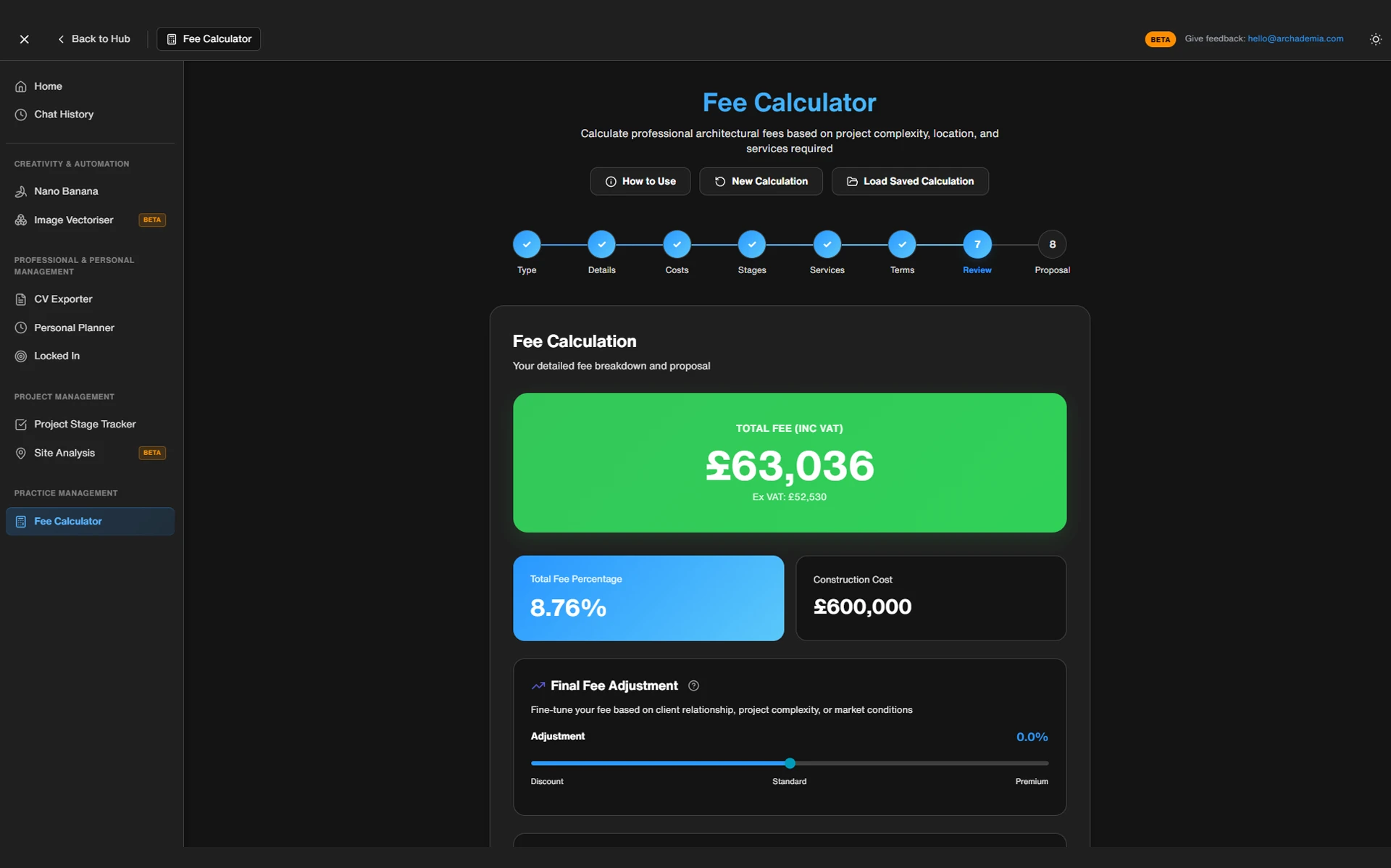
The Fee Calculator is built around RIBA fee guidance benchmarks. You input project type, estimated construction value, scope of services, and the RIBA stages you're covering, and it generates a defensible fee range — both as a percentage of construction cost and as a flat figure. It gives you something to show a client that isn't just a number you arrived at by feel.
The CV Exporter pulls directly from your Drawing Board profile — the portfolio platform built into every ArchAdemia membership. Populate your profile with projects, skills, qualifications, and experience once, and the exporter generates a formatted, print-ready PDF CV on demand. Different templates for different contexts: practice job applications, freelance pitches, Part III documentation.
The Project Tracker organises live projects by RIBA Plan of Work stage (0–6), with milestone dates and deliverable checklists per stage. It's not trying to be Asana. It's trying to be the thing you actually use instead of a Post-it note on your monitor.
What It Doesn't Replace
Be clear about this. The Toolkit is not an accounting package, not a contract generator, and not a full project management system. It works best alongside tools like Xero or FreeAgent for invoicing — it handles the architecture-specific planning that generic software ignores, while your accounting tool handles the money. For practices with ten or more staff who need task assignment, client portals, and time-recording integrations, something like Rapport3 or Synergy is the right call.
Feature
ArchAdemia Toolkit
Excel / Word
Harvest
Rapport3
FeatureRIBA fee benchmarking
ArchAdemia Toolkit✓
Excel / Word✗
Harvest✗
Rapport3✓
FeatureRIBA Plan of Work stages
ArchAdemia Toolkit✓
Excel / WordManual
Harvest✗
Rapport3✓
FeatureCV exporter
ArchAdemia Toolkit✓
Excel / WordManual
Harvest✗
Rapport3✗
FeaturePortfolio integration
ArchAdemia Toolkit✓
Excel / Word✗
Harvest✗
Rapport3✗
FeatureTime recording
ArchAdemia Toolkit✗
Excel / WordManual
Harvest✓
Rapport3✓
FeatureClient portal
ArchAdemia Toolkit✗
Excel / Word✗
Harvest✗
Rapport3✓
FeatureTeam task assignment
ArchAdemia Toolkit✗
Excel / WordManual
Harvest✓
Rapport3✓
FeatureCost
ArchAdemia ToolkitIncluded with membership
Excel / WordFree
HarvestFrom ~£10/mo
Rapport3From ~£60/mo
FeatureBest for
ArchAdemia ToolkitSole practitioners, small practices
Excel / WordAnyone with patience
HarvestFreelancers
Rapport310+ staff practices
The Fee Calculator: Stop Guessing and Start Charging What You're Worth
ArchAdemia's fee calculator benchmarks against RIBA fee guidance, generating both a percentage-of-construction-cost range and a flat fee equivalent for residential and commercial projects. For sole practitioners and small practices quoting projects up to £5m construction value, it's the most direct architecture fee tool available without paying for enterprise practice management software.
How to Set It Up for Your Project Type
The inputs are straightforward: project type (new build, extension, refurbishment, listed building), estimated construction value, the RIBA stages you're providing services for, and whether you're coordinating specialist consultants. That last one matters more than most architects account for. Coordinating a structural engineer, an M&E consultant, and a planning consultant on a residential project isn't the same as running a straightforward single-stage extension — the fee should reflect it.
The calculator outputs a percentage range aligned to RIBA fee guidance — which for residential projects typically sits between 8% and 15% of construction cost, depending on complexity and scope. It also converts that to a flat figure, because most residential clients don't want to hear a percentage. They want a number.
Reading the Output Without Panicking
Here's the scenario most architects recognise. You quote a residential extension at £8,000 because it feels about right for the project, the client seems budget-conscious, and you don't want to lose the job. You end up doing 180 hours of work. That's an effective hourly rate of £44. Below minimum wage once you account for the hours you spent chasing the planning officer, revising drawings after the client changed their mind twice, and writing the planning statement yourself.
Run the same project through the fee calculator with the scope properly defined — full RIBA stages 1 through 4, consultant coordination, planning application included — and it comes out at £12,500. That's a 56% difference. It's still competitive in the residential market. The client doesn't walk. You just stopped subsidising their extension out of your own time.
The practical rule: use the calculator at the enquiry stage, before you've said any number out loud. Once you've anchored a client to a figure, adjusting upward is a much harder conversation. One caveat worth noting — the calculator works from construction cost estimates, which are themselves uncertain in 2026's materials market. Build contingency into your inputs. If the client's builder quotes £180k and you've based your fee on £150k, that's a problem you created.
The CV Exporter: Your Portfolio Is Doing the Work, Your CV Is Losing the Job
ArchAdemia's CV exporter generates a formatted, print-ready architect CV directly from a member's Drawing Board profile, with layout templates for practice applications, freelance pitches, and Part III documentation. It removes the hours architects lose reformatting Word documents for every application.
Linking Your Drawing Board Profile
The workflow is simple in principle, but the value compounds over time. Populate your Drawing Board profile once — projects with images and descriptions, software skills, qualifications, professional memberships, employment history. The CV exporter reads from that profile and formats it according to whichever template you select. Every time you complete a project and add it to your Drawing Board, your CV is automatically current. You're not maintaining two separate documents.
The problem it solves is real. Architects routinely spend three to six hours reformatting CVs for different applications — different practices want different formats, different emphasis, different page lengths. Some want a two-page document with a project image grid. Some want a clean single-column text CV for their HR system. Some want a portfolio-CV hybrid. The exporter handles the formatting. You handle the content once.
Formatting for RIBA-Registered Practice Applications vs Freelance Pitches
The template options map to the contexts architects actually face. For practice job applications, the format emphasises project experience, software proficiency, and qualifications in a clean, professional layout that reads well on screen and in print. For freelance pitches, there's more emphasis on project outcomes and client types. For Part III candidates, this is where it gets specifically useful.
The best CV tool for Part III candidates in 2026 is one that maps experience to ARB competency requirements — ArchAdemia's CV exporter includes templates structured for this purpose. The RIBA Part III requires candidates to demonstrate competency across specific criteria, and the template structures project summaries and experience logs in a way that maps directly to that framework. It won't write your case study for you. But it will stop you submitting a generic CV when your assessors are looking for evidence of specific competencies.
One honest limitation: the CV exporter is only as good as your Drawing Board profile. If your profile has three projects and a list of software skills, your CV will reflect that. The tool formats — you still have to populate it. The architects who get the most out of it are the ones who treat their Drawing Board profile as a live document, not something they update when they're job hunting.
The Project Tracker: RIBA Plan of Work Without the Spreadsheet Hell
ArchAdemia's project tracker organises architecture projects by RIBA Plan of Work stage (0–6), with milestone tracking and deliverable checklists — designed for sole practitioners and small practices running up to ten live projects simultaneously.
Setting Up a Project from Scratch
Create a project, assign it a current RIBA stage, set key milestone dates — planning submission target, building regulations application, tender issue, start on site — and add deliverables per stage. The setup takes about ten minutes for a typical residential project. The tracker then monitors against those dates and flags anything that's overdue or coming up within a defined window.
The before scenario: a sole practitioner running four concurrent projects misses a planning submission deadline because the target date was in an email from six weeks ago, buried under a hundred other messages, and there was no system flagging it as imminent. The planning officer's consultation period lapses. The client is unhappy. The resubmission costs time and credibility.
The after scenario: the tracker flags the deadline fourteen days out with a deliverables checklist — planning drawings, planning statement, heritage statement, ecological survey, all listed. Nothing is forgotten because nothing is stored in your head.
Using It Across Multiple Live Projects
The multi-project dashboard shows all live projects simultaneously, with their current RIBA stage, upcoming milestones, and any overdue items. For a sole practitioner or a small practice, this view is genuinely useful for resource planning. When you can see that three projects are all hitting Stage 3 in the same month, you can see the crunch coming before it arrives. That's the difference between planning your workload and surviving it.
Feature
ArchAdemia Tracker
Rapport3
Asana
FeatureRIBA Plan of Work stages
ArchAdemia Tracker✓
Rapport3✓
AsanaManual setup
FeatureDeliverable checklists
ArchAdemia Tracker✓
Rapport3✓
Asana✓
FeatureMulti-project dashboard
ArchAdemia Tracker✓
Rapport3✓
Asana✓
FeatureTeam task assignment
ArchAdemia Tracker✗
Rapport3✓
Asana✓
FeatureClient portal
ArchAdemia Tracker✗
Rapport3✓
Asana✗
FeatureTime recording
ArchAdemia Tracker✗
Rapport3✓
Asana✗
FeatureArchitecture-specific templates
ArchAdemia Tracker✓
Rapport3✓
Asana✗
FeatureCost
ArchAdemia TrackerIncluded with membership
Rapport3From ~£60/mo
AsanaFree–£10/mo/user
FeatureBest for
ArchAdemia TrackerSole practitioners, 1–5 staff
Rapport35–50 staff practices
AsanaNon-architecture teams
The honest limitation: the project tracker is not a collaboration tool. There's no task assignment for team members, no comment threads, no client-facing portal. For practices of ten or more staff, Rapport3 or Synergy handles the complexity the Toolkit doesn't. The Toolkit is for the architect who needs to stop losing things in their inbox — not for managing a multi-disciplinary team across a £50m project.
Three Tools, One Loop — And Why That Matters
The real value of ArchAdemia's Toolkit is the workflow loop: fee calculator at enquiry stage, project tracker through delivery, CV exporter updated as projects complete and feed back into the Drawing Board profile. Each tool works in isolation. Together, they form a continuous practice management cycle.
The full loop looks like this. A new enquiry comes in for a residential extension. You run it through the fee calculator — construction value £160k, RIBA stages 1–4, planning application included — and it comes out at £14,000. You submit that as your proposal. The client accepts. You create the project in the tracker, assign it to Stage 1, set your planning submission target for twelve weeks out, and add your Stage 1 deliverables checklist. The project runs. Stages progress. Deadlines are flagged. The project completes. You add it to your Drawing Board — images, project description, construction value, your role. The CV exporter now includes it automatically in every CV you generate going forward.
Before the Toolkit, those three functions existed in three different places with no connection — a percentage scribbled on a notepad, a project in a shared drive folder, a CV in a Word document last updated eighteen months ago. After, they're a single loop that gets more valuable the more consistently you use it.
The compounding effect is real. Your fee benchmarks get sharper as you quote more projects through the calculator and see what wins and what doesn't. Your project data gets richer as you track more stages and start to see patterns in where your time actually goes. Your CV stays current without effort.
For Part III candidates specifically, using all three tools through the qualification period creates a natural evidence base for competency documentation. Your project tracker shows the stages you've managed. Your Drawing Board shows the projects you've delivered. Your CV exporter formats it in a structure your assessors can follow. That's not an accident — it's what the tools were designed to do.
Who Gets the Most Out of This (And Who Probably Doesn't)
Sole practitioners are the primary audience, and the Toolkit is purpose-built for them. The same person quoting fees, tracking deadlines, and updating their CV is exactly who these tools are designed for. There's no overhead, no onboarding, no team to train.
Part III candidates get specific value from the RIBA stage tracking and the competency-mapped CV templates. If you're going through qualification in 2026, using the Toolkit through that period gives you documentation that maps directly to what your assessors need to see. The Part III masterclass on ArchAdemia covers the qualification process in depth — the Toolkit sits alongside it as the practical infrastructure.
Small practices of two to five architects can use the multi-project dashboard for shared visibility and the fee calculator for consistent benchmarking across the team. It's not a collaboration platform, but at this scale you probably don't need one yet.
Practices of ten or more staff will hit the Toolkit's limits. No task assignment, no client portal, no time recording. Rapport3 or Synergy is the right answer at that scale. The Toolkit isn't pretending to compete with them.
Archviz freelancers will find the project tracker doesn't map well to their workflow — if you're not running RIBA stage projects, the stage-based structure is more friction than value. The CV exporter still works. The fee calculator less so.
The honest version: the Toolkit is not the only tool you'll ever need to run a practice. It's the tool that fills the gap between 'I'm winging it' and 'I have a system.' For most small practices, that gap is where the money goes.
Running a Practice Like a Business Isn't Optional Anymore
Architecture practice management tools have been either too generic or too expensive for small practices for too long. Spreadsheets don't know what RIBA Stage 2 means. Enterprise software assumes you have a finance director and an IT department. The Toolkit sits in the gap — specific enough to be genuinely useful, simple enough to actually use.
If you're quoting fees from memory, tracking projects in your inbox, and updating your CV the night before an application closes, you're not running a practice. You're improvising one. The tools to stop doing that are already included in your ArchAdemia membership.
The Toolkit is at archademia.com/toolkit/. If you're not a member yet, everything — the Toolkit, 60+ courses, the Drawing Board, and Corb — is available through a single membership at archademia.com/pricing.
Frequently Asked Questions
What is ArchAdemia's Toolkit?
ArchAdemia's Toolkit is a suite of three practice management tools for architects: a RIBA-aligned fee calculator, a CV exporter linked to the Drawing Board portfolio platform, and a RIBA Plan of Work project tracker. All three tools are included with every ArchAdemia membership at no additional cost.
Is ArchAdemia's Toolkit free?
The Toolkit is included with all ArchAdemia memberships — there is no separate charge. ArchAdemia membership starts at a single subscription price that covers the Toolkit, 60+ courses, the Drawing Board portfolio platform, and the Corb AI assistant. Pricing is available at archademia.com/pricing.
What is the best fee calculator for architects in 2026?
The best architecture fee calculator for sole practitioners and small practices in 2026 is one that benchmarks against RIBA fee guidance and accounts for scope of services by RIBA work stage — ArchAdemia's fee calculator does both. RIBA fee guidance for residential projects typically ranges from 8% to 15% of construction cost depending on complexity.
Can ArchAdemia's Toolkit replace Rapport3 or Synergy?
No — ArchAdemia's Toolkit is not a replacement for Rapport3 or Synergy for larger practices. It does not include time recording, client portals, or team task assignment. For practices of ten or more staff, Rapport3 or Synergy is more appropriate. The Toolkit is designed for sole practitioners and small practices of up to five architects.
How does the CV exporter work?
ArchAdemia's CV exporter generates a formatted, print-ready PDF CV by pulling data directly from a member's Drawing Board profile. You populate your profile with projects, skills, and qualifications once, then select a layout template — for practice applications, freelance pitches, or Part III documentation — and the exporter formats it automatically.
Is the project tracker useful for Part III candidates?
Yes — ArchAdemia's project tracker organises projects by RIBA Plan of Work stage (0–6) with milestone tracking and deliverable checklists, which maps directly to the experience documentation required for RIBA Part III. Using the tracker through the qualification period creates a natural evidence base for competency assessments.
What does ArchAdemia's Toolkit not do?
The Toolkit does not handle invoicing, accounting, contract generation, time recording, client communication, or team task assignment. It works best alongside accounting software like Xero or FreeAgent, which handle the financial functions the Toolkit doesn't cover.
Who is ArchAdemia's Toolkit best suited for?
ArchAdemia's Toolkit is best suited for sole practitioner architects, small practices of two to five staff, and Part III candidates. It is less suited to practices of ten or more staff who need collaboration features, and to archviz freelancers whose workflow doesn't follow RIBA Plan of Work stages.