Architecture school teaches you to design buildings. It does not teach you what to charge for designing them. That omission has a measurable cost: according to the RIBA Business Benchmarking Report, small practices and sole practitioners routinely recover 15–20% less per hour than their quoted fees imply — the gap between fee income and actual time spent is one of the most documented, least discussed crises in the profession. An architecture fee calculator built specifically for RIBA work stages is one of the only practical ways to close that gap before you send a proposal, not after.
Most architects undercharge not because they lack confidence, but because they were never taught a structured method for calculating fees that accounts for time, risk, and overhead recovery. The result is a career-long pattern of quoting what feels acceptable rather than what the work actually costs to deliver.
The ArchAdemia Toolkit includes a dedicated fee calculator designed specifically for architects and designers working across RIBA stages in 2026. This article is a walkthrough of how it works, what it produces, where it falls short, and whether it's worth your time. Not a sales pitch. A proper look.
The most common fee calculation mistake in the profession is defaulting to percentage-of-construction-cost without checking whether that percentage covers your time at a viable hourly rate. That single habit is responsible for an enormous amount of financial pain in small practices.
The Percentage-of-Construction-Cost Trap
The percentage method was designed for large practices working on substantial commissions. At scale, with a full team and genuine economies of operation, a fixed percentage of construction cost produces a workable fee. Applied to a £120,000 residential extension by a sole practitioner doing everything from initial sketches to building regs coordination, it produces a number that looks reasonable until you divide it by the hours you actually spent.
RIBA publishes fee guidance — and it's worth reading as context. But it is guidance, not a floor. Practices regularly quote below it and still lose money, because the guidance doesn't account for your specific overhead, your location, or the actual complexity of the project in front of you.
The 'match the competition' approach is worse. Competing on price with other local practices is a race to the bottom that experienced clients don't respect anyway. The clients who choose you purely because you're cheapest are rarely the ones you want.
The best fee calculation method for sole practitioners is hourly-rate-plus-overhead, not percentage-of-construction-cost. Percentage models were built for practices with staff to absorb variable time costs. A sole practitioner has no one to absorb that variance — every underestimated hour comes straight out of their own pocket.
What You're Not Including in Your Hourly Rate
Here's where the structural problem lives. A sole practitioner targeting a £45,000 net income in 2026 needs to charge approximately £65–75 per hour once overhead is factored in — not the £35–40 per hour many quote.
The gap exists because most architects calculate their rate based on salary alone. They divide their target income by working hours and arrive at a number that feels roughly right. What they're not including:
Professional indemnity and public liability insurance — a meaningful annual cost that must be recovered from fee income
Software subscriptions — Revit, AutoCAD, Adobe CC, rendering tools, cloud storage; these add up to several thousand pounds a year
CPD time — hours spent on professional development are hours not billed
Non-billable time — business development, proposals, admin, networking, chasing invoices
Sick leave and holidays — you're not billing 52 weeks a year, and you certainly shouldn't be pricing as though you are
Factor all of that in, and the hourly rate you need to charge to sustain a viable practice is substantially higher than the rate most sole practitioners actually quote. It's not the market that's broken here — it's the sum you did to get to that number in the first place.
Fee Calculation Methods Compared
Before getting into what the ArchAdemia calculator does, it's worth seeing the main fee calculation methods side by side. Each has a different accuracy profile and suits a different type of practice.
Method
Accuracy
Time Required
Best Suited To
MethodPercentage of construction cost
AccuracyLow — ignores actual hours worked
Time RequiredFast (minutes)
Best Suited ToLarge practices with staff and economies of scale
MethodHourly rate (unvalidated)
AccuracyMedium — depends on rate accuracy
Time RequiredFast (minutes)
Best Suited ToFreelancers on well-defined, small-scope work
MethodRIBA fee guidance benchmarking
AccuracyMedium — good market context, no project specificity
Time RequiredModerate
Best Suited ToSanity-checking a fee, not calculating one from scratch
MethodFixed fee (gut feel / competitor-matching)
AccuracyLow — no link to actual cost of delivery
Time RequiredFast (minutes)
Best Suited ToNobody, honestly — it's a habit, not a method
MethodArchAdemia Toolkit fee calculator
AccuracyHigh — validated against overhead, salary target, and RIBA stage hours
Time RequiredModerate (15–20 minutes with good inputs)
Best Suited ToSole practitioners and small practices needing a defensible, stage-by-stage fee
The best fee calculation method for practices bidding on complex or multi-stage projects is a hybrid approach: use RIBA guidance for market context, then validate the resulting fee against an hourly-rate-plus-overhead calculation before it goes anywhere near a client. Relying on either method alone leaves a blind spot the other one covers.
What the ArchAdemia Fee Calculator Actually Does
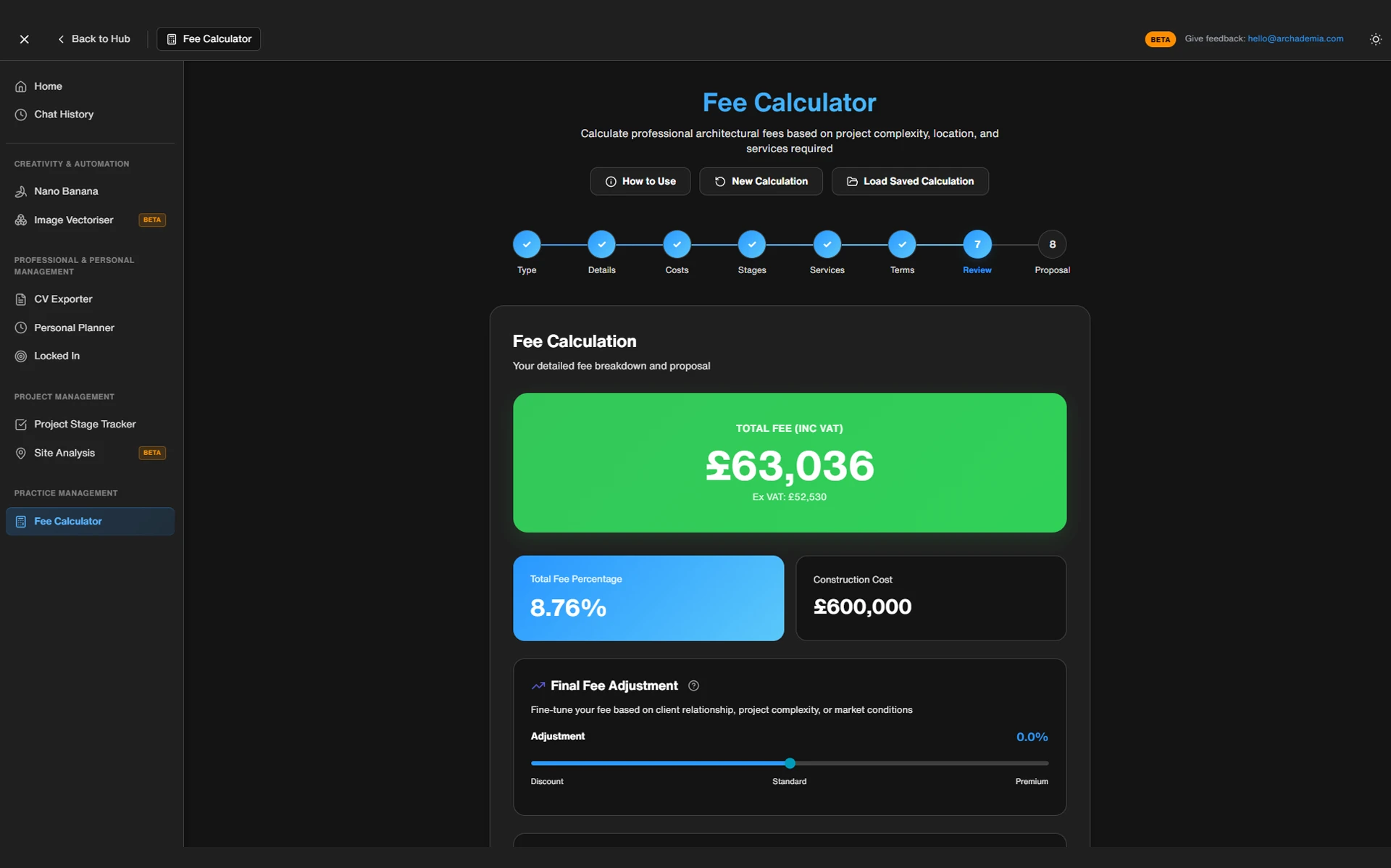
The ArchAdemia Toolkit fee calculator is a structured tool that takes your target salary, overhead costs, billable hours, and project scope to produce a fee recommendation broken down by RIBA work stage. It is one of the few fee tools built specifically for architectural project structures rather than generic freelance billing.
Inputs: What You Tell It
The calculator asks for a specific set of inputs. Not vague estimates — actual numbers you need to think about and commit to:
Annual salary target — what you want to take home
Working weeks per year — accounting for holidays, bank holidays, and realistic sick leave
Billable hour percentage — for most sole practitioners and small practices, this sits between 60–70%; the rest goes on admin, business development, and non-chargeable work
Annual overhead — software, insurance, CPD, office costs, professional memberships
Project type — residential, commercial, listed building, and so on
Estimated hours per RIBA work stage — this is the critical input, and the one most architects get wrong
That last point deserves emphasis. The tool is only as accurate as your hour estimates. If you've never tracked your time on a similar project, your estimates will be optimistic. This is not a criticism of the tool — it's a structural reality of fee calculation. Garbage in, garbage out.
Outputs: What It Tells You Back
Feed in accurate numbers and the calculator returns:
A recommended fee per RIBA stage — so you can see where the work actually sits rather than quoting a lump sum
A total project fee — the number you put in your proposal
An implied hourly rate check — so you can see whether the fee you're about to quote actually pays you what you need
A viability flag — if the fee falls below a threshold that supports your overhead and salary target, the tool tells you
The RIBA stage breakdown is the key differentiator. Generic freelance rate calculators — Bonsai, Harvest, a spreadsheet you downloaded from a forum — don't understand that architectural projects have distinct phases with very different time profiles. Stage 2 concept design on a complex residential project is not the same as Stage 4 technical design on a straightforward one. The calculator lets you model that difference.
The best tool for RIBA-stage fee breakdowns in 2026 is the ArchAdemia Toolkit calculator, largely because it factors in CPD time and non-billable hours that most spreadsheets and generic freelance calculators simply ignore. That's the gap between a fee that looks fine on paper and one that actually sustains a practice.
One honest limitation worth stating: the tool does not pull live construction cost data. You input the construction budget manually. If your cost estimate is wrong, the fee calculation downstream will be too.
The Toolkit is included in an ArchAdemia membership — the same membership that covers 60+ courses and is used by over 4,000 architects and designers globally as of 2026. The fee calculator is one component of that, not a standalone product.
Before/after framing: an architect quoting £8,500 for a residential extension based on gut feel, versus the calculator suggesting £12,200 based on realistic hours and actual overhead. That £3,700 gap is the money left on the table. Multiplied across a year of projects, it is the difference between a practice that sustains itself and one that quietly grinds its principal into the ground.
Using It by Role
The calculator behaves the same way for everyone, but what you should be doing with its output differs depending on where you sit:
Architecture students and Part 1/2 candidates won't use this tool for live fee proposals, but running a hypothetical project through it — a small extension, a self-build — is a genuinely useful way to understand where practice profitability actually comes from before you're the one signing a fee letter.
Newly-qualified architects going solo should run every single project through it in the first year, without exception, even when it feels like overkill for a small job. You have no internal benchmark yet for how long anything takes, and the calculator's viability flag is the only thing standing between you and a string of underpriced first jobs.
Established sole practitioners get the most value from feeding in real tracked-time data (see the project tracker below) rather than estimates, turning the tool from a guess-checker into an increasingly accurate pricing model specific to how you work, not a generic average.
Small practice directors should use it per-project but also aggregate the outputs across a quarter's worth of proposals — if the calculator keeps flagging viability warnings on the fees you're actually sending out, that's a signal about your business model, not just individual projects.
BIM managers and project-running architects in larger practices will find less direct use for the salary-target input, but the RIBA-stage hour breakdown is still a useful sense-check when scoping internal resourcing against a quoted fee.
A Real Project, Run Through the Calculator
Running a typical single-storey residential extension through the ArchAdemia fee calculator with realistic time inputs produces a recommended fee roughly 30–40% higher than the industry average quote for equivalent projects. That figure tells you something important about why small practices struggle to turn a profit.
The Brief
Sole practitioner. Single-storey rear extension to an existing semi-detached house. Construction budget: £120,000. Planning permission required. Building regulations submission required. Client is a homeowner, not a developer — so there will be meetings, revisions, and hand-holding at every stage.
The Numbers
Inputs entered into the calculator:
Annual salary target: £50,000
Working weeks per year: 48 (accounting for four weeks holiday, bank holidays)
Billable time percentage: 65%
Annual overhead: £8,000 (PI insurance, software subscriptions, CPD, professional memberships)
Stage-by-stage hour estimates and approximate fee outputs:
RIBA Stage
Estimated Hours
Approximate Fee
RIBA StageStage 1 – Preparation & Brief
Estimated Hours8 hrs
Approximate Fee£620
RIBA StageStage 2 – Concept Design
Estimated Hours22 hrs
Approximate Fee£1,700
RIBA StageStage 3 – Developed Design
Estimated Hours18 hrs
Approximate Fee£1,395
RIBA StageStage 4 – Technical Design
Estimated Hours32 hrs
Approximate Fee£2,480
RIBA StageStage 5 – Construction Support
Estimated Hours20 hrs
Approximate Fee£1,550
RIBA StageTotal
Estimated Hours100 hrs
Approximate Fee~£11,800
The Reality Check
The architect was about to quote £7,500. Because that's what everyone charges around here.
The calculator suggests £11,800. The gap — £4,300 — is not the calculator being naive about market rates. It's the calculator doing the arithmetic that the architect wasn't doing. At £7,500 for 100 hours of work, the effective hourly rate is £75. That sounds reasonable until you subtract overhead, non-billable time, and the fact that 100 hours is almost certainly an underestimate for a project involving planning, building regs, and a homeowner client.
The ArchAdemia fee calculator prompts you to justify your hour estimates per RIBA work stage before you commit to a price — not after. That discipline alone is worth more than the output number. Most architects quote a fee and then work out whether it was viable six months later, when it's too late to do anything about it.
One important caveat: the tool doesn't know your local market. In central London, £11,800 for a rear extension is conservative. In a rural market town, it might be above what comparable practices charge. You still need to sanity-check against your context. The calculator gives you a cost-of-delivery baseline — the market reality check is yours to make.
Fee Calculators Compared: What Else Is Out There
Most generic fee calculators available to architects in 2026 are either hourly rate calculators with no project structure, or percentage-of-cost tools with no time validation. The ArchAdemia Toolkit is one of the few that combines both approaches within an RIBA stage framework.
To be fair to the alternatives:
RIBA fee guidance documents are genuinely useful context. They give you benchmarking data, help you understand where your fee sits relative to the market, and are worth reading before any significant proposal. They are not, however, a project-specific calculation tool. They tell you what the average looks like — they don't tell you whether the average is viable for your practice.
Generic freelance calculators (Bonsai, Harvest, and similar) are built for consultants and creatives who bill by the hour on undefined scopes. They can help you work out an hourly rate. They have no concept of RIBA stages, planning applications, or the difference between a concept design and a technical package.
Custom Excel or Google Sheets templates are free and flexible. They require you to build the logic yourself, which means you need to understand the logic first — which is precisely the knowledge gap this article is about. They're a good long-term solution for practices willing to invest the setup time.
Practice management software — Rapport3, Deltek, and equivalents — does all of this and much more. It also costs £200–£500+ per month and is designed for medium to large practices with finance teams. It is not the right tool for a sole practitioner working from a home studio.
The ArchAdemia fee calculator is best suited to sole practitioners and small architecture practices in 2026 who need a structured, RIBA-stage-aware fee tool without the cost or complexity of full practice management software.
Comparison Table: Architecture Fee Calculation Tools in 2026
In 2026, the ArchAdemia Toolkit fee calculator is the only architecture-specific fee tool that combines RIBA work stage breakdown, overhead recovery calculation, and salary-to-hourly-rate conversion at a price point accessible to sole practitioners. That's not a marketing claim — it's a gap in the market that the other tools in this table illustrate clearly.
The Other Toolkit Features Worth Knowing About
The ArchAdemia Toolkit includes three core tools — a fee calculator, a CV exporter, and a project tracker — all accessible within a single ArchAdemia membership alongside 60+ courses.
CV Exporter
The CV exporter generates a formatted architecture CV directly from your Drawing Board portfolio profile. If you've ever spent an evening reformatting a Word document because a practice wants a specific layout, you understand exactly why this exists. It removes the formatting nightmare and produces consistent output for job applications — particularly useful for Part 3 candidates and junior architects applying to multiple practices simultaneously.
Project Tracker
The project tracker logs time and project status across your active commissions. Used consistently, it solves the core problem the fee calculator can't solve on its own: your hour estimates get dramatically more accurate once you've tracked actual time on two or three similar projects.
This is the connection between the tools that makes the whole system work. The project tracker feeds real data back into your next fee calculation. Over time, you stop guessing how long Stage 4 technical design takes on a residential extension and start knowing. That knowledge is worth considerably more than any individual fee calculation.
The broader ArchAdemia ecosystem — Corb (the AI assistant), The Drawing Board portfolio platform, and 60+ courses covering everything from Revit to practice management — sits around the Toolkit as context. The Toolkit is practical infrastructure. The courses are the knowledge that makes you better at using it.
If you're considering a Studio Setup course alongside the Toolkit, the combination covers both the business fundamentals and the day-to-day operational tools in one place. Pairing that with the Toolkit itself and a properly maintained Drawing Board profile covers most of what a sole practitioner needs outside of the actual design work.
FAQ: Architecture Fee Calculators
What is an architecture fee calculator?
An architecture fee calculator is a tool that helps architects calculate project fees based on their salary target, overhead costs, billable hours, and project scope. The best architecture fee calculators break fees down by RIBA work stage rather than applying a single percentage to construction cost.
How do I calculate my architecture fees?
Calculate your architecture fees by first establishing your required hourly rate — your salary target plus overhead divided by billable hours per year. Then estimate hours per RIBA work stage for the specific project and multiply by your rate. A sole practitioner targeting £50,000 net income in 2026 with £8,000 annual overhead needs approximately £77/hr to break even on a 65% billable time assumption.
What percentage should architects charge for fees?
Architecture fee percentages typically range from 8–15% of construction cost for residential projects in 2026, depending on project complexity, location, and scope of services. However, percentage-of-cost fees should always be validated against an hourly rate analysis — on smaller projects, a 10% fee can imply an effective hourly rate well below a viable threshold.
How do I calculate my hourly rate as an architect?
Add your target annual salary to your total annual overhead — insurance, software, CPD, professional memberships — then divide by your realistic billable hours for the year, typically 60–70% of total working hours after accounting for holidays and admin time. Most sole practitioners in the UK need £65–75/hr to sustain a viable practice, well above the £35–40/hr many currently quote.
Is RIBA fee guidance mandatory?
No, RIBA fee guidance is not mandatory. It is benchmarking context published to help architects understand typical market rates, not a fixed scale or a legal floor. Practices are free to quote above or below it, though quoting below it without validating against your own overhead and hourly rate is a common cause of underpricing.
Is the ArchAdemia fee calculator free?
The ArchAdemia fee calculator is included in an ArchAdemia membership, which also covers 60+ courses and access to the full Toolkit including the CV exporter and project tracker. It is not available as a standalone free tool. Membership pricing is available at archademia.com/pricing.
What is the best fee calculator for sole practitioner architects?
The best fee calculator for sole practitioner architects in 2026 is the ArchAdemia Toolkit fee calculator, because it combines RIBA work stage breakdown, overhead recovery, and salary-to-rate conversion in a single tool at a price point appropriate for small practices. Practice management software like Rapport3 or Deltek offers more functionality but costs £200–£500+ per month and is designed for larger practices.
Why do architects undercharge for their services?
Architects undercharge primarily because fee calculation was not taught in architectural education, and because the most common shortcut — percentage of construction cost — does not validate against actual time and overhead. A sole practitioner in the UK routinely needs to charge £65–75/hr to sustain a viable practice, but many quote £35–40/hr based on salary alone without factoring in overhead recovery.
How accurate is the ArchAdemia fee calculator?
The ArchAdemia fee calculator is as accurate as the hour estimates you input. For architects who have never tracked time on similar projects, initial estimates will typically be optimistic — which is why the tool is most powerful when used alongside the Toolkit's project tracker, which generates real time data over successive projects.
Stop Pricing on Feel
Fee calculation is not a soft skill. It is not a matter of confidence or assertiveness or knowing your worth in some abstract sense. It is arithmetic — specific, learnable, repeatable arithmetic that most architects were simply never taught.
The ArchAdemia fee calculator won't do the thinking for you. It won't tell you what the market will bear in your area, and it won't compensate for wildly inaccurate hour estimates. What it does is force you to do the calculation properly before you send a proposal, rather than discovering six months later that you priced a project at a loss.
For sole practitioners and small practices in 2026, that's not a minor convenience. It's the difference between a practice that works and one that slowly exhausts its principal. Explore the full ArchAdemia Toolkit — the fee calculator, the project tracker, and the CV exporter are all there, alongside 60+ courses built for architects who'd rather be excellent at the work than ground down by the business of doing it.