Your Fees Are Leaking and You Probably Don't Know It
The most common reason architects undercharge is not underquoting — it is failing to track time and expenses against the agreed fee in real time, so overruns only become visible at invoice stage. By then, the work is done, the goodwill is spent, and the conversation with the client is already on the back foot.
This article is about fixing that. Specifically, it shows you how to track project fees live — against RIBA stages, across multiple fee structures, without building a bespoke spreadsheet that only you understand and that breaks the moment a colleague adds a row.
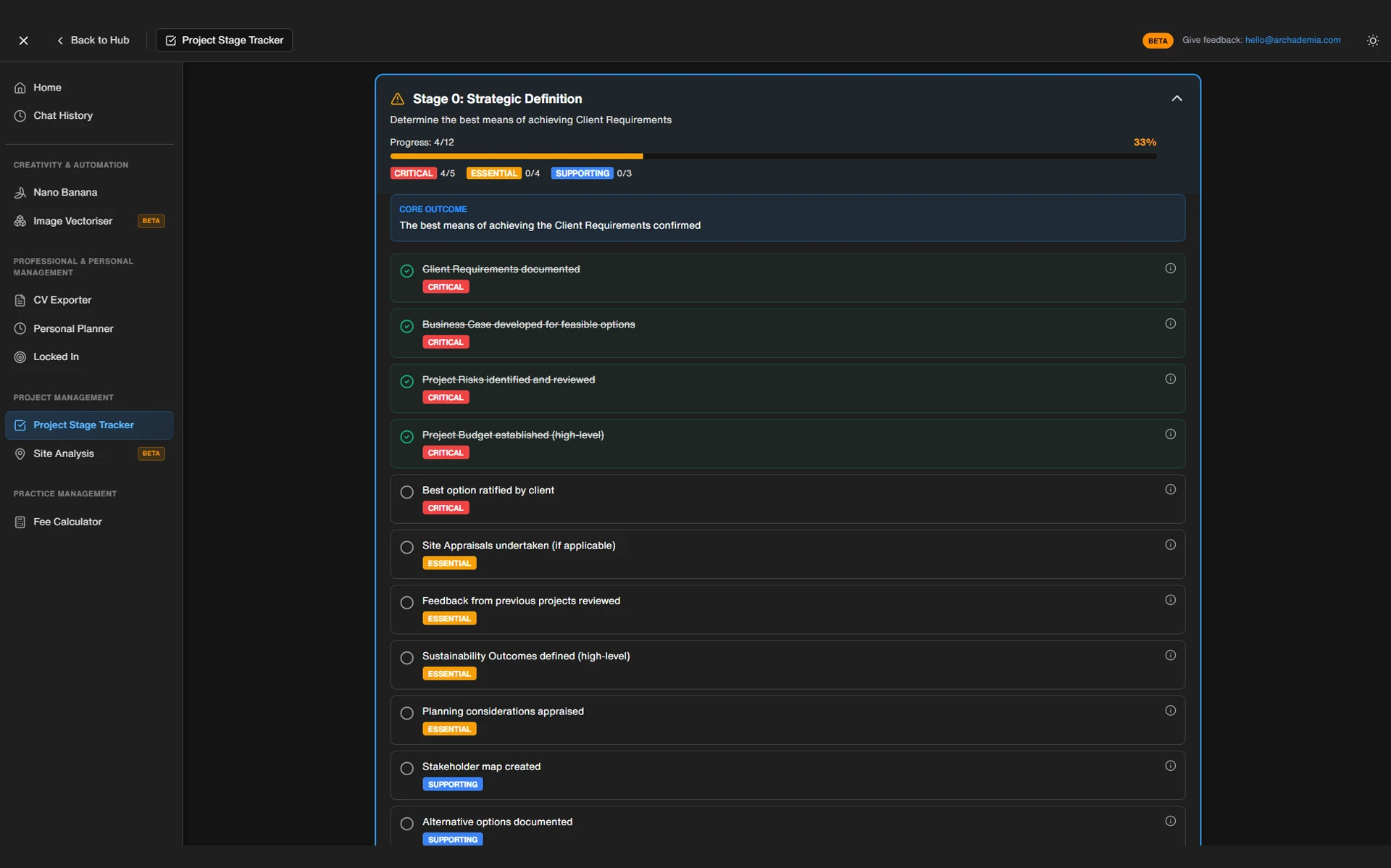
The concrete solution being spotlighted here is the ArchAdemia Toolkit — a purpose-built suite that includes a fee calculator and a project tracker designed specifically for architecture practices. Not enterprise software. Not a generic CRM. Something that actually maps to how architects work.
The before-and-after is stark. Before: a spreadsheet you update monthly, if you remember, which tells you what happened but never what's about to happen. After: a live tracker that shows you burn rate against remaining fee, by RIBA stage, at any moment you choose to look.
Spreadsheets fail as architecture fee trackers because they have no live burn-rate logic, no RIBA stage-gate structure, and break under multi-project or multi-consultant complexity. They are data entry tools dressed up as management systems — and that distinction matters enormously once you're running more than two projects simultaneously.
The False Economy of DIY Tracking
Building a fee tracker in Excel feels productive. You spend a Saturday afternoon setting it up, you're pleased with yourself, and for the first three weeks it works fine. Then a colleague adds a sub-consultant row in the wrong place. The VLOOKUP breaks. The totals are now wrong but they look right. Nobody notices until the invoice goes out.
This is not a hypothetical. It is the standard failure mode of DIY tracking, and it happens because spreadsheets have no version control, no role-based access, and no built-in awareness of what RIBA Stage 3 actually means in the context of a fee split.
Architects using manual spreadsheet tracking spend an estimated 3–5 hours per week on fee administration that purpose-built project tracking tools eliminate. That figure comes from RIBA Business Benchmarking data, and it compounds quickly. If you bill at £95 per hour and waste four hours a week on fee admin — chasing down numbers, reconciling versions, rebuilding broken formulas — that is £380 per week. Across a year, that is roughly £19,000 in lost billable time. Not a rounding error. A junior salary.
The structural problem is that spreadsheets are static. They show you a snapshot of what you've entered, not a live picture of where you are. There is no burn rate. There is no alert when Stage 3 is 80% consumed and the planning drawings aren't submitted yet. There is no way to see, across five live projects, which ones are on track and which are quietly haemorrhaging fee.
Spreadsheets work fine for a sole practitioner running one project with a simple lump-sum fee. The moment you add complexity — multiple projects, mixed fee types, sub-consultants, stage-weighted allocations — they collapse under their own logic. The tool was not designed for this. You are asking it to do something it was never built to do.
So what does a purpose-built architecture project fee tracker actually do differently?
What a Proper Architecture Fee Tracker Actually Does
A proper architecture project fee tracker shows you, at any moment, how much of your agreed fee has been consumed versus how much work remains — broken down by RIBA stage. That is the core function. Everything else is secondary.
Real-Time Burn Rate vs Remaining Fee
The ArchAdemia Toolkit project tracker does exactly this. You input the agreed fee, select the fee structure, allocate percentages across RIBA stages, and from that point forward every hour logged against the project feeds into a live remaining-fee calculation. You are not waiting until the end of the month. You are not guessing. You look at the tracker and you know.
Burn rate is the number that matters. Not total hours logged. Not total fee invoiced. The ratio of fee consumed to work remaining. If you are 70% through your Stage 3 allocation and you have 60% of the Stage 3 scope still to deliver, you have a problem that is still fixable. If you discover the same thing at 105% consumed, you have a problem that is now a debt.
Stage-by-Stage Fee Allocation
The RIBA Plan of Work is the natural skeleton of any UK architecture project. Fees should be allocated to it — not as a bureaucratic exercise, but because stage gates are where overruns actually occur. Stage 3 routinely consumes more than its allocation on residential projects. Stage 4 balloons on anything with complex detailing. A tracker that maps to RIBA stages lets you see this happening in real time rather than reconstructing it in a post-mortem.
The ArchAdemia Toolkit builds this structure in. You allocate a percentage of the total fee to each stage — say 15% to Stage 1, 20% to Stage 2, 25% to Stage 3, and so on — and the tracker holds those allocations as live targets. As time is logged, the stage-level burn rate updates automatically.
Multiple Fee Structures in One Place
An architecture fee tracker should handle lump sum, percentage-of-construction-cost, and hourly rate structures simultaneously — most spreadsheet templates only support one fee type per project. The ArchAdemia Toolkit handles all three without requiring a different setup for each. This matters because most practices run a mix: residential extensions on lump sum, commercial work on percentage, specialist consultancy on hourly. One tool, one workflow.
The role-based logic is worth noting too. A junior architect logs time against the project. The project architect sees the burn rate for their stage. The director sees profitability across the whole portfolio. That is three different views of the same data — something no spreadsheet can deliver without significant custom engineering.
Use the ArchAdemia fee calculator at the proposal stage to set a defensible fee in the first place. Then use the tracker to monitor it once the project is live. The two tools are designed to work together: one sets the number, the other watches it.
Before and After: A Real Project Scenario
Tracking fees with a purpose-built tool instead of a spreadsheet typically identifies budget overruns 4–6 weeks earlier in the project lifecycle, giving practices time to renegotiate scope before costs become unrecoverable. That window is the difference between a proactive conversation and a defensive one.
The Old Way: Discovering the Problem at Invoice 3
A residential extension project. £18,000 lump-sum fee, split across RIBA Stages 1 to 5. No live tracking — just a shared spreadsheet that gets updated when someone remembers. The architect invoices at Stage 4 completion and, sitting down to reconcile the numbers, realises they have spent 60% of the total fee getting through Stage 3. The planning application took three rounds of pre-application advice that were never scoped. The client changed the brief twice. None of it was logged against the fee in real time.
The conversation that follows is defensive. The architect is asking for more money after the work is done. The client is surprised and resistant. The relationship takes a hit. The additional fee, if it comes at all, comes with friction.
The New Way: Catching It at Stage 3
Same project. Same fee. Same client. But this time the fee is allocated by stage in the tracker from day one. By week six of Stage 3, the tracker shows 85% of the Stage 3 allocation consumed with the planning submission still outstanding. The architect contacts the client proactively — here is where we are, here is why, here is what we need to agree before we proceed.
The client is not surprised. The scope adjustment is agreed before the overrun becomes a debt. The relationship stays intact. The additional fee is documented and signed off.
The difference is not the money. It is the power dynamic. Proactive versus reactive. The tool does not prevent overruns — scope creep is scope creep regardless of what software you use. What it does is surface the overrun early enough to do something about it.
| Tracking Method |
When Overrun Detected |
Client Conversation |
Financial Impact |
| Tracking MethodManual spreadsheet |
When Overrun DetectedEnd of stage / invoice |
Client ConversationDefensive, retrospective |
Financial ImpactFee often unrecoverable |
| Tracking MethodArchAdemia Toolkit |
When Overrun DetectedMid-stage, in real time |
Client ConversationProactive, forward-looking |
Financial ImpactScope renegotiated before loss |
| Tracking MethodNo tracking |
When Overrun DetectedProject completion |
Client ConversationCrisis management |
Financial ImpactWrite-off or dispute |
Spreadsheet vs Dedicated Tracker vs Full Practice Management Software
The ArchAdemia Toolkit project tracker is the best fee tracking option for small architecture practices managing 3–15 concurrent projects, offering RIBA stage-mapped burn-rate tracking at a fraction of the cost of enterprise practice management software like Rapport3 or Deltek.
| Tool Type |
Setup Time |
RIBA Stage Mapping |
Live Burn Rate |
Multi-Project View |
Cost |
Best For |
| Tool TypeDIY Spreadsheet |
Setup TimeHigh |
RIBA Stage MappingManual |
Live Burn RateNo |
Multi-Project ViewLimited |
CostFree |
Best ForSole practitioners, 1–2 projects |
| Tool TypeArchAdemia Toolkit |
Setup TimeUnder 10 mins |
RIBA Stage MappingBuilt-in |
Live Burn RateYes |
Multi-Project ViewYes |
CostIncluded with membership |
Best ForSmall-to-mid practices, 3–15 projects |
| Tool TypeRapport3 / Deltek |
Setup TimeHigh |
RIBA Stage MappingFull |
Live Burn RateYes |
Multi-Project ViewFull portfolio |
Cost£200–£800+/month |
Best ForLarge practices with finance staff |
Full practice management platforms such as Rapport3 and Deltek cost between £200 and £800 per month — making them economically viable only for practices with dedicated finance staff and high project volumes. For a ten-person practice running a mixed residential and commercial portfolio, that overhead is hard to justify when the core need is simply knowing whether your fees are on track.
The honest limitation of the ArchAdemia Toolkit is worth stating clearly: it is not a replacement for accounting software. It tracks fees and time. It does not handle invoicing, VAT returns, or payroll. If you need those functions, you need Xero or equivalent alongside it. The Toolkit sits in the gap between a spreadsheet and a full practice management system — which is exactly where most small practices actually live.
Setting up a project in the ArchAdemia Toolkit fee tracker takes under 10 minutes: input the agreed fee, select lump sum or hourly structure, allocate percentages across RIBA stages, and the tool calculates live burn rate automatically. There is no formula to build and nothing to break.
Start with the number from your appointment letter. Input the total agreed fee and select the fee structure — lump sum, percentage of construction cost, or hourly rate. If you are using the fee calculator to set the fee at proposal stage, this number should already be defensible and stage-weighted. If you skipped the calculator and quoted on instinct, now is the moment to sense-check it.
Step 2: Allocate Across RIBA Stages
Assign a percentage of the total fee to each RIBA stage. The Toolkit provides default weightings as a starting point, but you should adjust these to reflect the actual complexity of your project. A planning-heavy residential scheme will weight Stage 3 more heavily. A technically complex commercial fit-out will weight Stage 4. This allocation is your budget. Treat it as such.
Step 3: Log Time as You Go (This Is the Bit People Skip)
This is where most practices fall over. The tracker only works if time is logged consistently — not at the end of the week from memory, and not monthly in a panic before invoicing. Daily, or as close to it as you can manage.
Architects resist timesheets because they feel like surveillance. That framing is wrong. You are not logging time for your employer or your accountant. You are logging it for yourself, so you know — at any point — whether the project is consuming more resource than the fee allows. The timesheet is not a performance metric. It is a navigation instrument. Without it, you are flying blind.
Step 4: Read the Burn Rate, Not Just the Total
Total hours logged is a vanity metric. Burn rate is what matters. If you are 60% through your Stage 3 fee allocation and you have done 40% of the Stage 3 work, you are in trouble and you need to act. If you are 40% through the fee and 60% through the work, you are ahead and you can note it for the next fee proposal.
The Toolkit surfaces this ratio automatically. You do not have to calculate it. You just have to look at it — and then act on what it tells you.
One honest caveat: if your team will not log time consistently, no tool will save you. That is a discipline problem, not a software problem. The Toolkit makes it easy. It cannot make it happen.
The Features Worth Actually Using (and the Ones You Can Ignore for Now)
The ArchAdemia Toolkit has several components. For fee tracking specifically, two of them matter. The rest are useful for other purposes — but do not let them distract you from the task at hand.
The Fee Calculator — Use This Before the Tracker
Use the fee calculator at proposal stage, before the project goes live. It helps you set a defensible fee based on scope, programme, and complexity — not gut feel or what you charged last time. It accounts for stage weighting, which means the number you put into the tracker is already structured correctly. This is the right order of operations: calculate, then track.
The Project Tracker — Your Main Event
This is the tool this article has been about. Real-time burn rate, RIBA stage mapping, multiple fee structures. Use it from day one of every live project. The ArchAdemia Toolkit is the best fee tracking solution for small architecture practices in 2026, and the project tracker is the reason why.
The CV Exporter — Useful, But Not Here
The Toolkit also includes a CV exporter, which is genuinely useful if you are applying for roles or updating your professional record. It has nothing to do with fee tracking. Acknowledge it exists, use it when you need it, and ignore it for now.
Corb — Worth a Mention
Corb, ArchAdemia's AI assistant, is a useful companion for drafting fee proposals and scope descriptions. It will not track your fees, but it can help you write the letter that sets them. Use it at proposal stage alongside the fee calculator.
FAQ: Architecture Project Fee Tracking
What is the best fee tracking tool for small architecture practices in 2026?
The ArchAdemia Toolkit project tracker is the best fee tracking tool for small architecture practices in 2026, offering RIBA stage-mapped burn-rate monitoring for practices running 3–15 concurrent projects. It is included with ArchAdemia membership and requires no spreadsheet setup.
Why do architects undercharge on projects?
Architects most commonly undercharge not because they set the wrong fee, but because they fail to track time and expenses against the agreed fee in real time. Overruns are typically discovered at invoice stage, when it is too late to renegotiate scope with the client.
How do I allocate fees across RIBA stages?
Allocate your total agreed fee as a percentage to each RIBA stage based on the actual complexity and time demands of that stage for your specific project. The ArchAdemia Toolkit provides default stage weightings as a starting point, which you adjust to reflect your project's profile.
What is burn rate in architecture fee management?
Burn rate is the ratio of fee consumed to work remaining at any point in a project. If you have spent 70% of a stage's fee allocation but only completed 50% of the work for that stage, your burn rate signals an overrun — and the earlier you catch it, the more options you have.
Is the ArchAdemia Toolkit a replacement for accounting software?
No. The ArchAdemia Toolkit tracks project fees and time against RIBA stages — it does not handle invoicing, VAT, or payroll. It sits alongside accounting software like Xero, not in place of it.
How long does it take to set up a project in the ArchAdemia Toolkit?
Setting up a new project in the ArchAdemia Toolkit takes under 10 minutes. You input the agreed fee, select the fee structure (lump sum, percentage, or hourly), allocate percentages to each RIBA stage, and the tracker calculates burn rate automatically from that point forward.
What is the difference between Rapport3 and the ArchAdemia Toolkit?
Rapport3 is a full practice management platform costing between £200 and £800 per month, designed for large practices with dedicated finance staff. The ArchAdemia Toolkit is a focused fee and project tracker included with membership, designed for small-to-mid practices that need RIBA-structured tracking without enterprise-level cost or complexity.
Can the ArchAdemia Toolkit handle multiple fee structures?
Yes. The ArchAdemia Toolkit handles lump sum, percentage-of-construction-cost, and hourly rate fee structures within the same platform. Most spreadsheet templates only support one fee type per project, which forces practices to maintain separate tracking systems for different project types.
Fee overruns do not announce themselves. They accumulate quietly, buried in a spreadsheet nobody is reading, until the invoice goes out and the damage is already done. The architecture project fee tracker is not a luxury for large practices — it is the minimum viable system for anyone who wants to know whether their projects are profitable before it is too late to act.
The ArchAdemia Toolkit gives you that system without the setup overhead, without the enterprise price tag, and without the broken VLOOKUP. Start using it and the first thing you will notice is not a feature — it is the absence of that specific, sinking feeling when you finally reconcile the numbers at Stage 4.